Define the payable piece in a pay profile, connect it to the exact worker and quantity or weight produced by a task, show the calculation during the workflow, and carry the completed amount into the worker’s estimated gross payroll without letting later rate edits rewrite finished work.
Named piece types
Quantity- and weight-based rates
Task source linking
Automatic worker attribution
Collection-unit selection
Worker-visible calculation
Historical rate context
Piece earnings in payroll
Gross-pay review
Inside the app
See the workflow.
Actual Farmroute screens from the farm and employee demo accounts.
01 · Configure
Connect the payable result to the task that produces it.
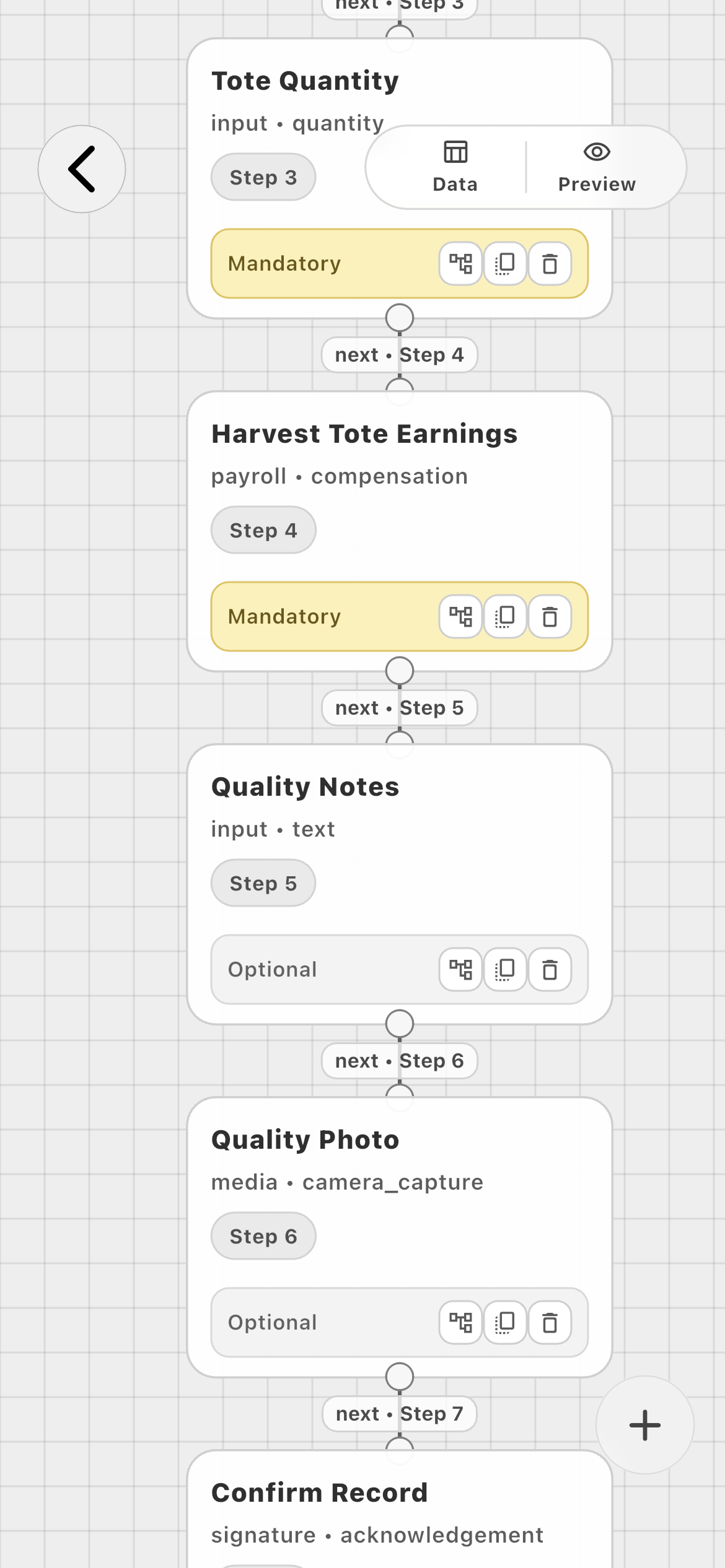
This example uses Harvest Quality Count. The farm records the performing worker and accepted tote quantity, then passes both sources into a mandatory Harvest Tote Earnings block.
Farm workflow01
Tote Quantity is Step 3. Harvest Tote Earnings is Step 4, before optional notes and evidence.
02 · Record
Let the employee enter the operational result once.
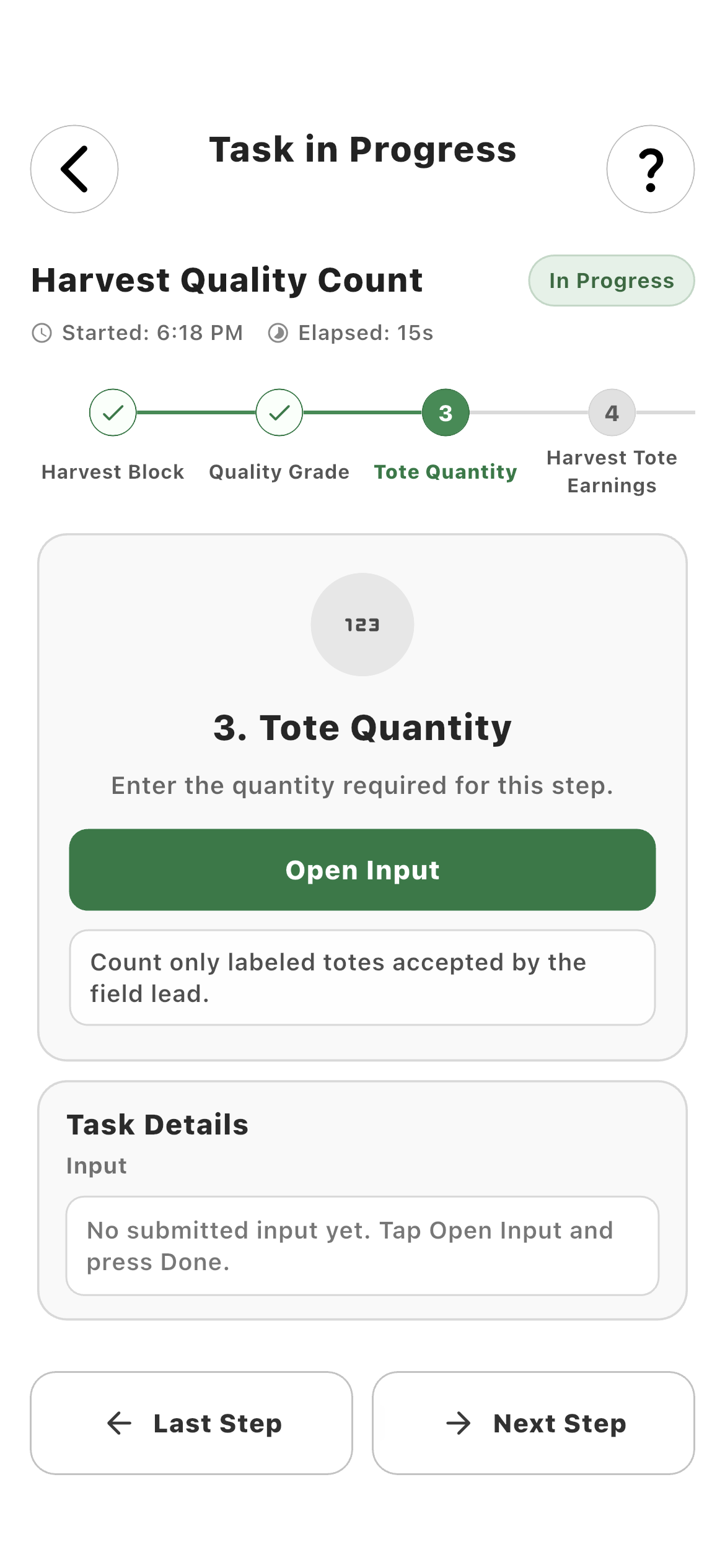
The employee records accepted production in the task—not once for operations and again for payroll. Mandatory progression prevents the payable step from running without its source quantity.
Source quantity01
The task asks for completed totes and explains that only labeled totes accepted by the field lead count.
Calculated earning02
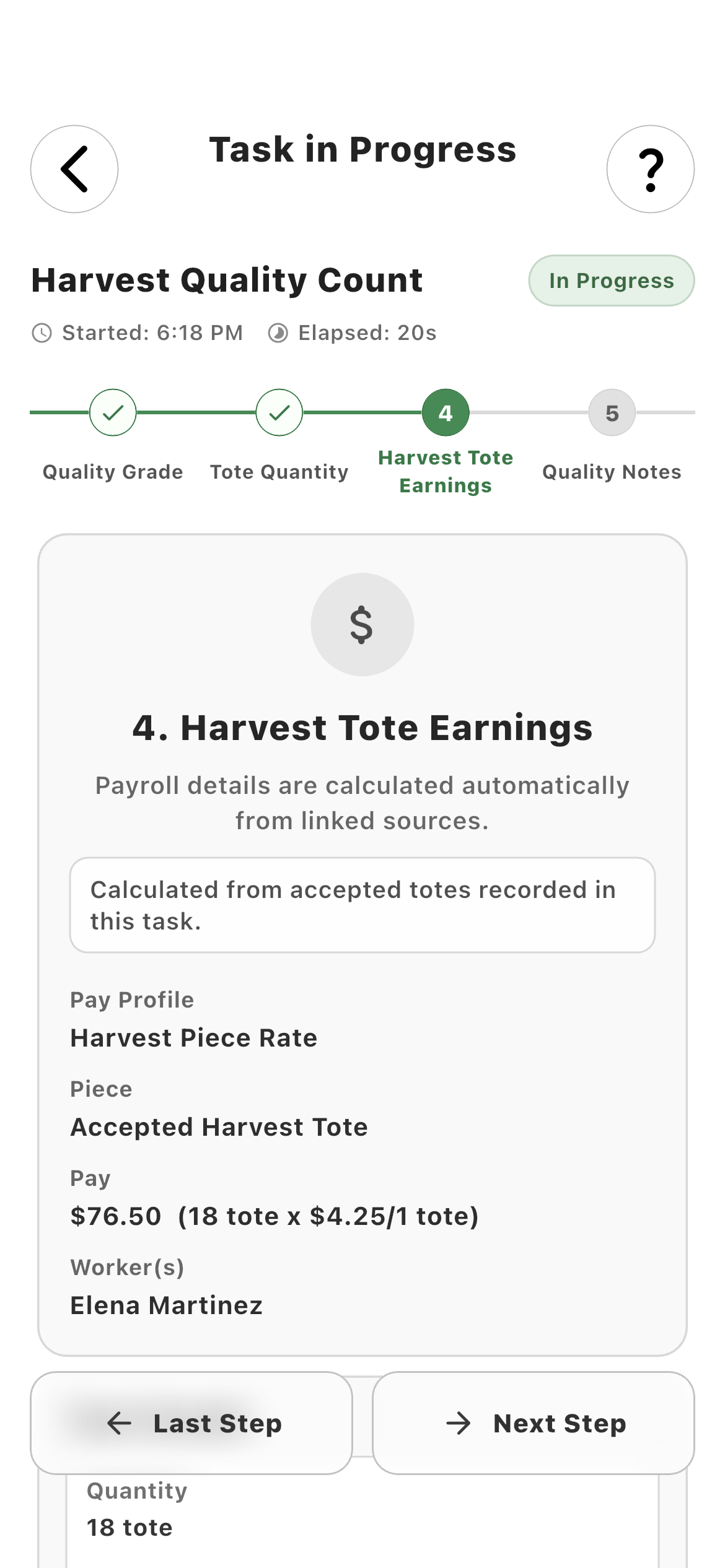
18 totes × $4.25 per tote produces $76.50 for Elena Martinez under Harvest Piece Rate.
03 · Review
Carry the completed task result into estimated gross payroll.
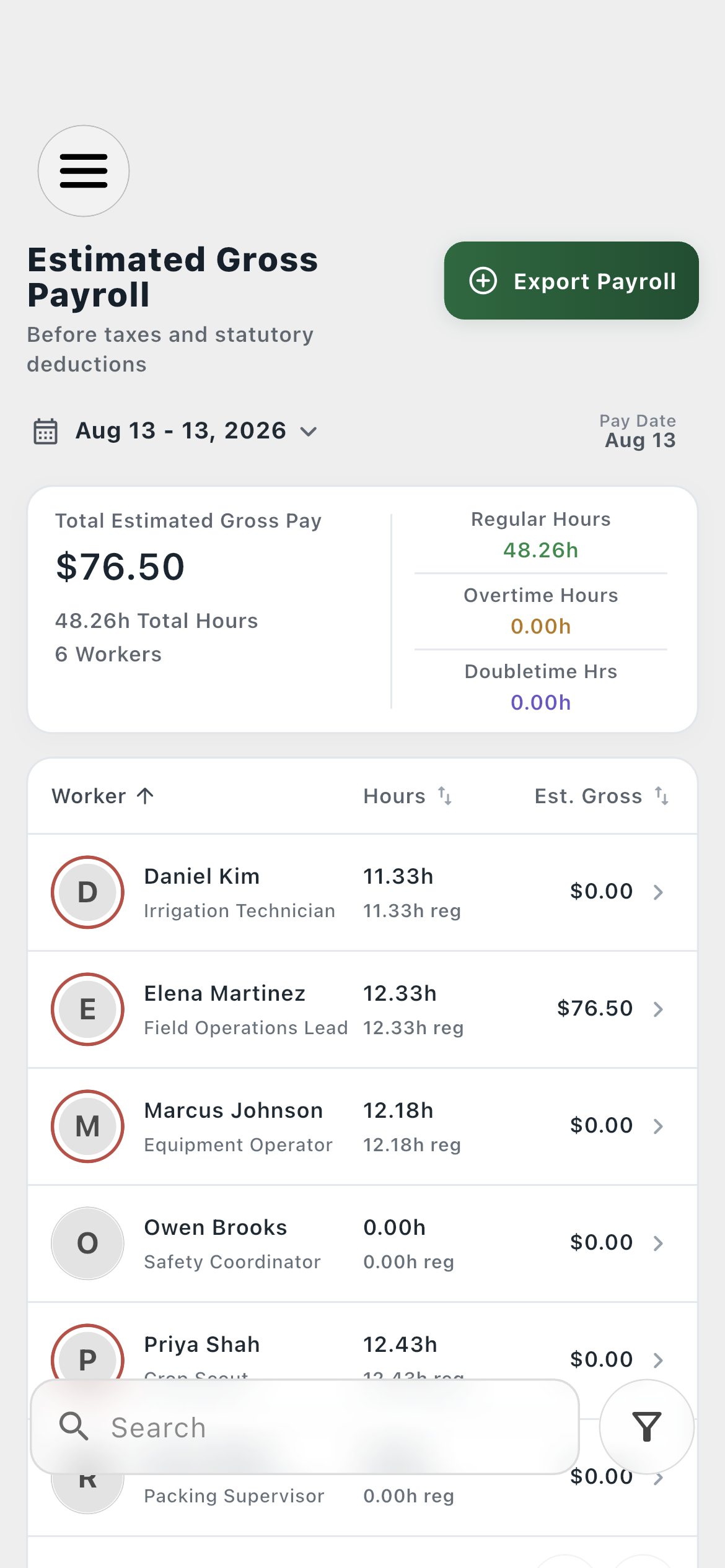
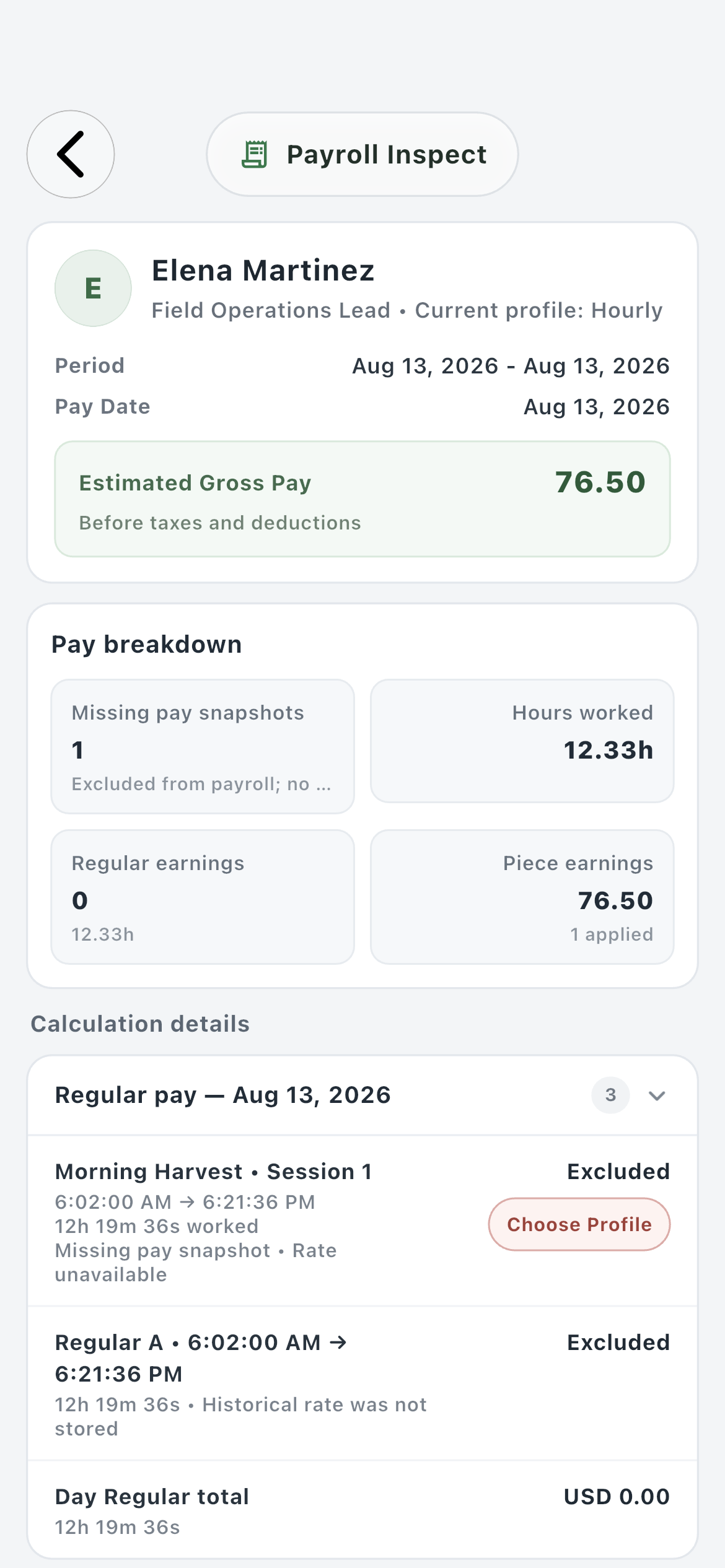
The piece event appears on the farm’s payroll date and inside the worker’s inspect page. Hours and piece earnings remain separate components, so the farm can see exactly where the gross estimate came from.
Payroll overview01
The daily overview attributes the $76.50 piece result to the correct worker.
Worker payroll02
Payroll Inspect separates Piece earnings from hours and shows one applied piece event.
How it works in practice
Built around the workday.
01
Worked example
18 accepted totes × $4.25 per tote = $76.50.
The Harvest Quality Count task captures a required Tote Quantity of 18. Its Harvest Tote Earnings block points to the Harvest Piece Rate profile, the Accepted Harvest Tote piece, and the Tote collection unit. The task calculates $76.50 and identifies Elena Martinez as the performing worker.
Pay profile: Harvest Piece Rate
Piece: Accepted Harvest Tote
Collection unit: Tote
Result: 18 × $4.25 = $76.50
02
Explicit definitions
Select the piece—never infer it from list order.
A pay profile may contain several crops, grades, containers, or weight definitions. The task stores the chosen profile and piece identifier, and quantity-based pieces also store the intended collection unit. That prevents a Blueberry task from accidentally using the first unrelated rate in the profile.
Named pay profile
Specific piece type
Explicit collection unit
No first-rate fallback
03
Source linking
Connect both who performed the work and what they produced.
Payroll / Compensation requires a worker source plus a quantity or weight source. In this example, Performing Worker is automatically attributed from the assigned employee and Tote Quantity supplies the payable amount. A different workflow could connect pounds, kilograms, bins, boxes, or another configured unit.
Performing Worker source
Quantity or weight source
One calculation from linked values
No duplicate payroll entry
04
Worker clarity
Show the calculation before the task is submitted.
The worker-facing step names the pay profile and piece, displays the calculation, and identifies the attributed worker. The employee does not need access to pay-profile administration, but they can see what the workflow is calculating from their recorded production.
Visible rate equation
Visible piece and pay profile
Visible worker attribution
Farm-only configuration remains hidden
05
Historical integrity
Preserve completed-work context when rates change later.
The piece event is created from the task run’s configured profile, piece, quantity or weight, unit, and calculated amount. Editing the pay profile afterward is for future work; completed piece earnings must keep the historical rate context used when that task was finished.
Completed result remains stable
Later profile edits apply prospectively
Multiple historical rate periods supported
Task and payroll records remain traceable
06
Payroll review
Keep piece earnings separate and understandable.
Payroll Inspect presents piece earnings as their own component alongside worked hours and other configured rules. Farmroute provides an estimated gross amount before taxes and deductions; it is not a tax-withholding or net-payroll engine.
Piece earnings component
Worker and date attribution
Estimated gross total
No net-pay or tax calculation claim
Roles and responsibility
Who does what.
Farm profile
Define, connect, and audit the payable operation.
The farm creates the rate definition, selects it in the task, connects the exact worker and measurement sources, and reviews the resulting piece event in payroll.
Specific profile, piece, and unit
Visual source connection
Reusable task definition
Piece earnings in worker payroll
Employee profile
Record production without administering payroll.
The worker completes the operational quantity or weight step and sees the calculation produced by the farm’s configuration. Pay-profile editing and payroll administration remain farm-only.
Guided quantity entry
Automatic identity attribution
Visible calculation
No administrative controls
Complete workflow
From start to finish.
01
Farm
Create the pay profile
Create Harvest Piece Rate as the definition that owns the payable pieces used by this operation.
02
Farm
Define the piece and rate
Add Accepted Harvest Tote, choose quantity-based compensation, name the Tote collection unit, and set $4.25 per 1 tote.
03
Farm
Capture worker and production sources
Add Performing Worker and Tote Quantity to the task workflow. Make the quantity mandatory when payroll depends on it.
04
Farm
Add Payroll / Compensation
Choose Harvest Piece Rate, Accepted Harvest Tote, and Tote, then link the worker output and quantity output explicitly.
05
Farm
Preview the calculation
Test the task with a known value before assignment and verify that the selected rate, unit, and worker source produce the expected amount.
06
Employee
Record accepted totes
During the assigned task, enter 18 completed totes after confirming the block and quality grade.
07
Employee
Review the calculated step
Farmroute displays $76.50 as 18 totes × $4.25 per tote and attributes it to Elena Martinez.
08
Employee
Submit the task
Completing the workflow saves the structured task result and creates its piece-earnings event.
09
Farm
Review Piece earnings
The payroll overview attributes $76.50 to Elena, while Payroll Inspect lists one applied piece earning separately from worked hours.
10
System
Keep the completed context
Future changes to the pay profile do not rewrite the completed piece event’s historical calculation.
Questions and answers
Frequently asked questions.
How does Farmroute track piece-rate farm work?
The farm defines a named piece and rate in a pay profile, then connects a task’s worker and quantity or weight outputs to Payroll / Compensation. The completed task creates a traceable piece-earnings event for the correct worker.
Can a task use quantities and weights for piece-rate calculations?
Yes. A piece can be quantity-based with named collection units such as totes, boxes, bins, or units, or weight-based with the supported measurement and conversion rules.
Does the employee see the piece-rate calculation?
Yes. The worker-facing payroll step can display the selected pay profile, piece, source quantity or weight, rate equation, calculated amount, and attributed worker without exposing administrative editing controls.
What happens if a pay profile contains several piece types?
The task must store the specific piece selected by the farm. Farmroute should not infer the piece from its position in a list or automatically use the first rate.
Will changing a piece rate modify completed work?
No. A later pay-profile edit is for future work. Completed piece events retain the historical context and amount used when the task was finished.
Where does completed piece work appear?
The result remains in the structured task record and its piece earnings appear as a separate component in the worker’s estimated gross payroll for the applicable date.
Does Farmroute calculate taxes or net payroll?
No. Farmroute presents estimated gross-pay records and supporting calculations before taxes and deductions. It is not presented as a tax-withholding, net-pay, or filing engine.
What if a piece-rate task is completed offline?
The device retains the task result locally and reconciles it through incremental sync after reconnecting. The saved database record remains authoritative, while real-time events update connected farm views when available.
Get started
Build your operation with Farmroute.
We pride ourselves on transparency. No need to call for a quote.