Map fields onto the document the farm already uses, assign a fresh form to an eligible worker, collect the worker portion without requiring clock-in, route farm-only follow-up fields, and retain one completed farm-owned PDF under the correct worker.
PDF field mapping
Worker form tasks
Page and field-list entry
Electronic signatures
Recursive farm follow-up
Farm-owned PDF retention
Inside the app
See the workflow.
Actual Farmroute screens from the farm and employee demo accounts.
01 · Prepare
Turn the farm’s existing PDF into a reusable form.
The source document stays recognizable. Farmroute adds a reusable field layer instead of replacing the farm’s layout with a generic survey.
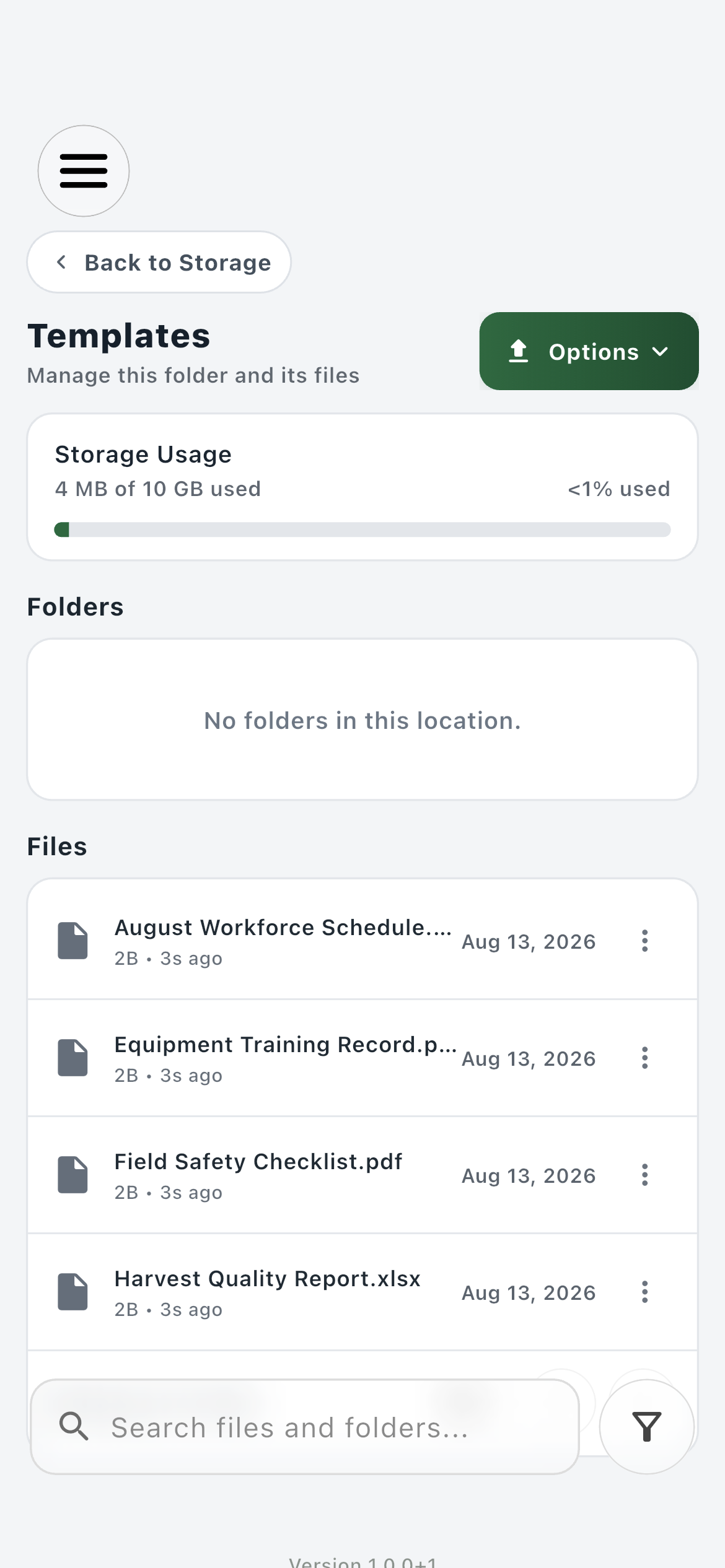
Template library01
Keep reusable source documents together in the farm’s Templates folder.
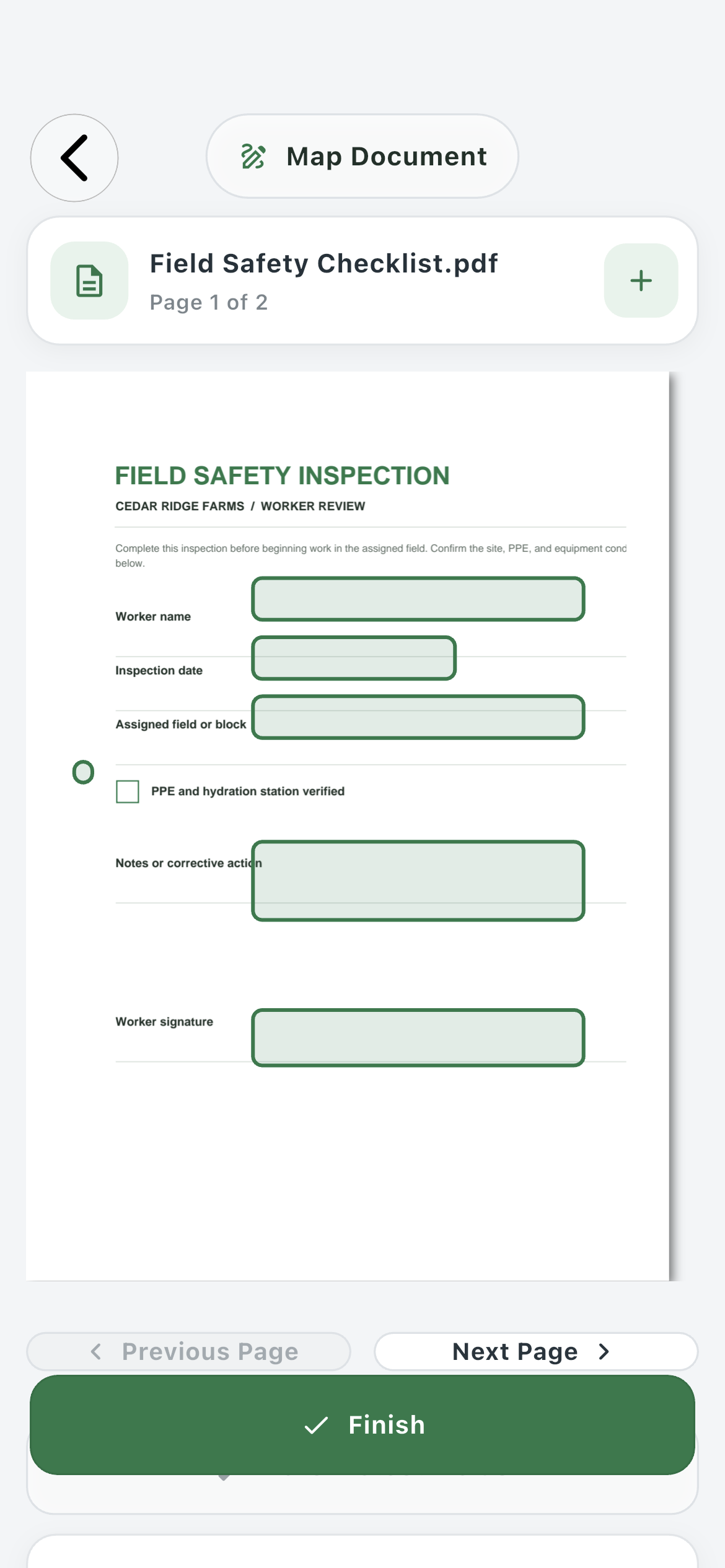
Map Document02
Place fields on the actual PDF pages, review their size and position, and distinguish worker fields from farm follow-up fields.
02 · Assign
Request a new response from the right worker.
A template is the reusable definition. Each assignment creates a separate fill request, so sending the same form again does not overwrite an earlier submission.
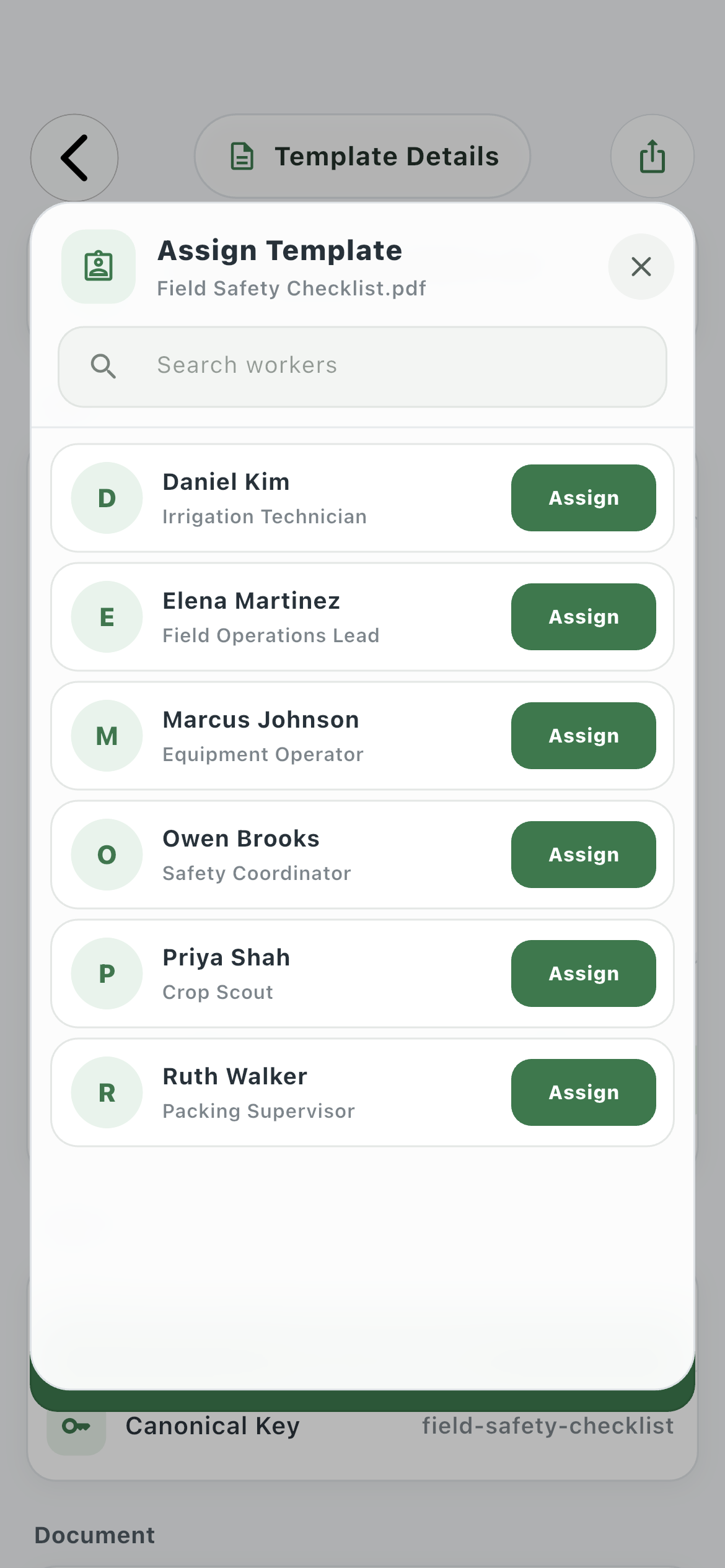
Farm assignment01
Search the current farm workforce and assign a fresh copy without exposing workers from another farm relationship.
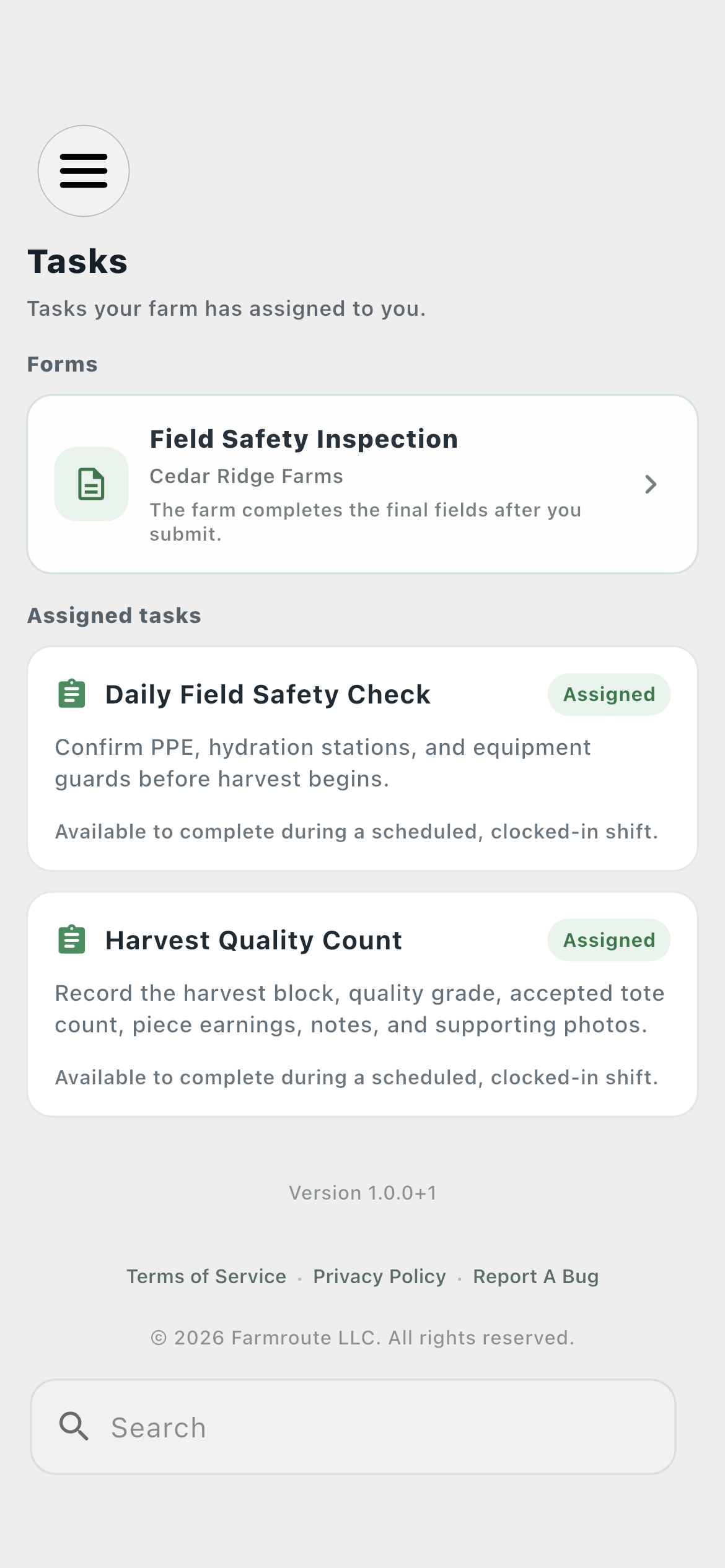
Employee Tasks02
The request names the farm and appears in its own Forms section above ordinary clock-gated tasks.
03 · Complete
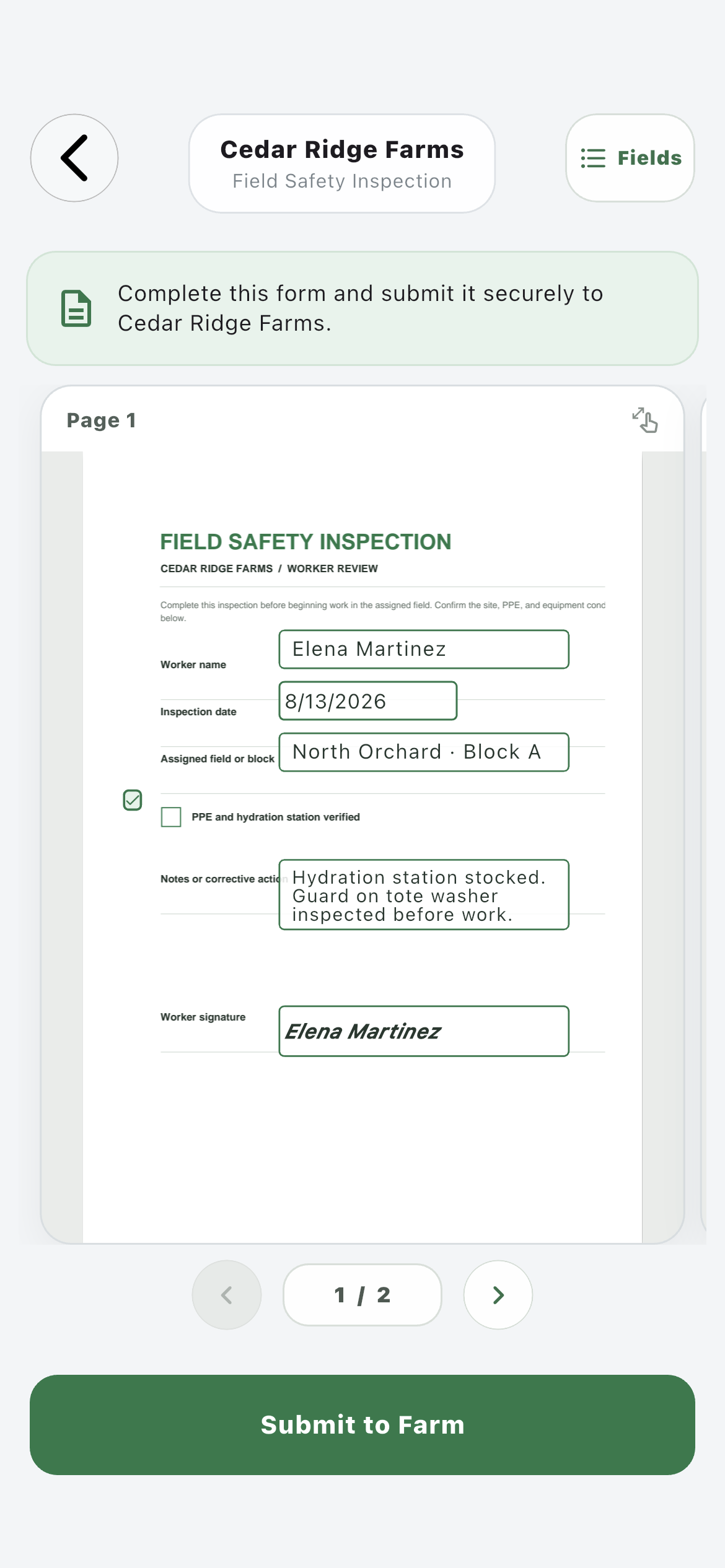
Fill the real document page by page—or use the field list.
The employee can work directly on the bounded PDF canvas, turn pages with clear controls, or open a structured field list when faster keyboard entry is more practical.
Document view01
Answers stay aligned to their mapped positions while the document remains inside a controlled page boundary.
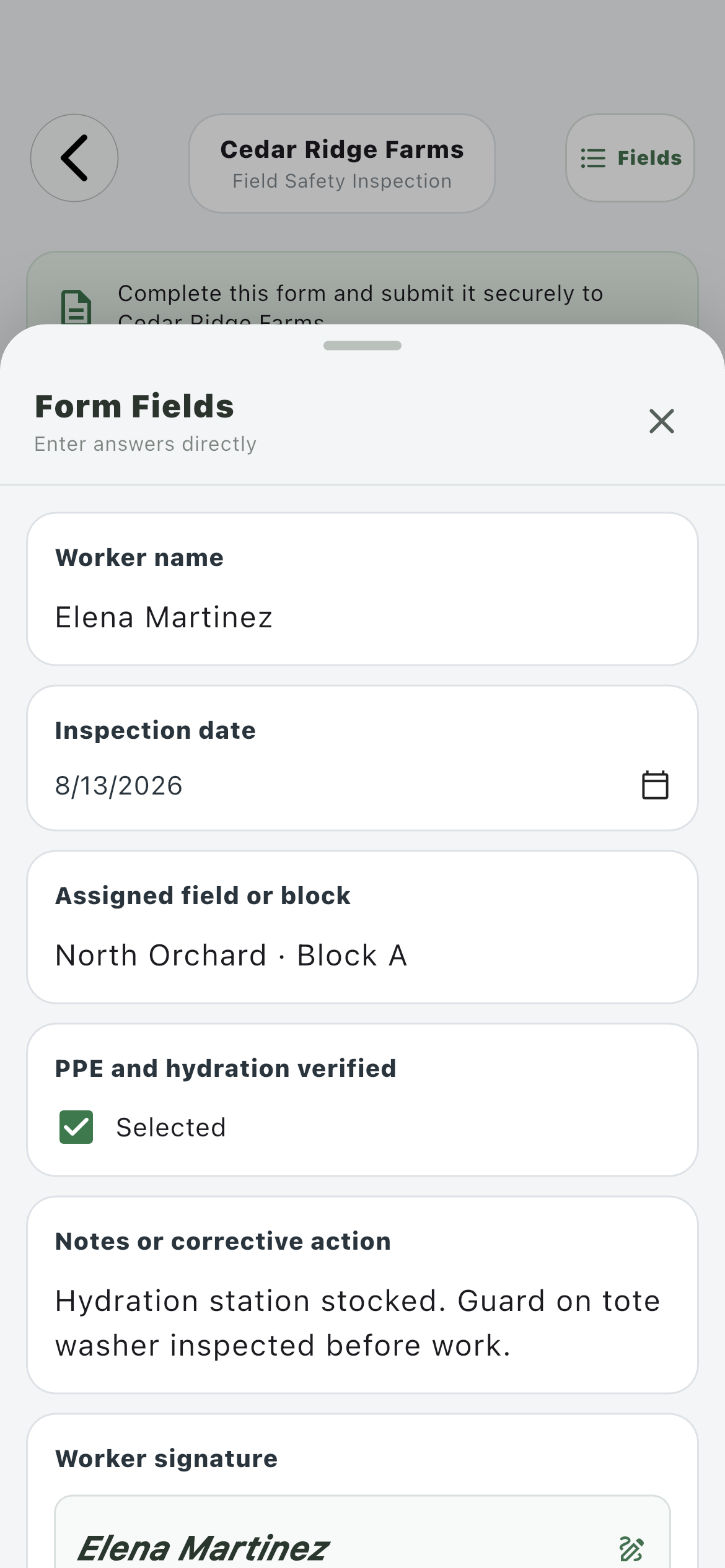
Field list02
The same answers can be entered from a readable list without exposing internal AcroForm field names.
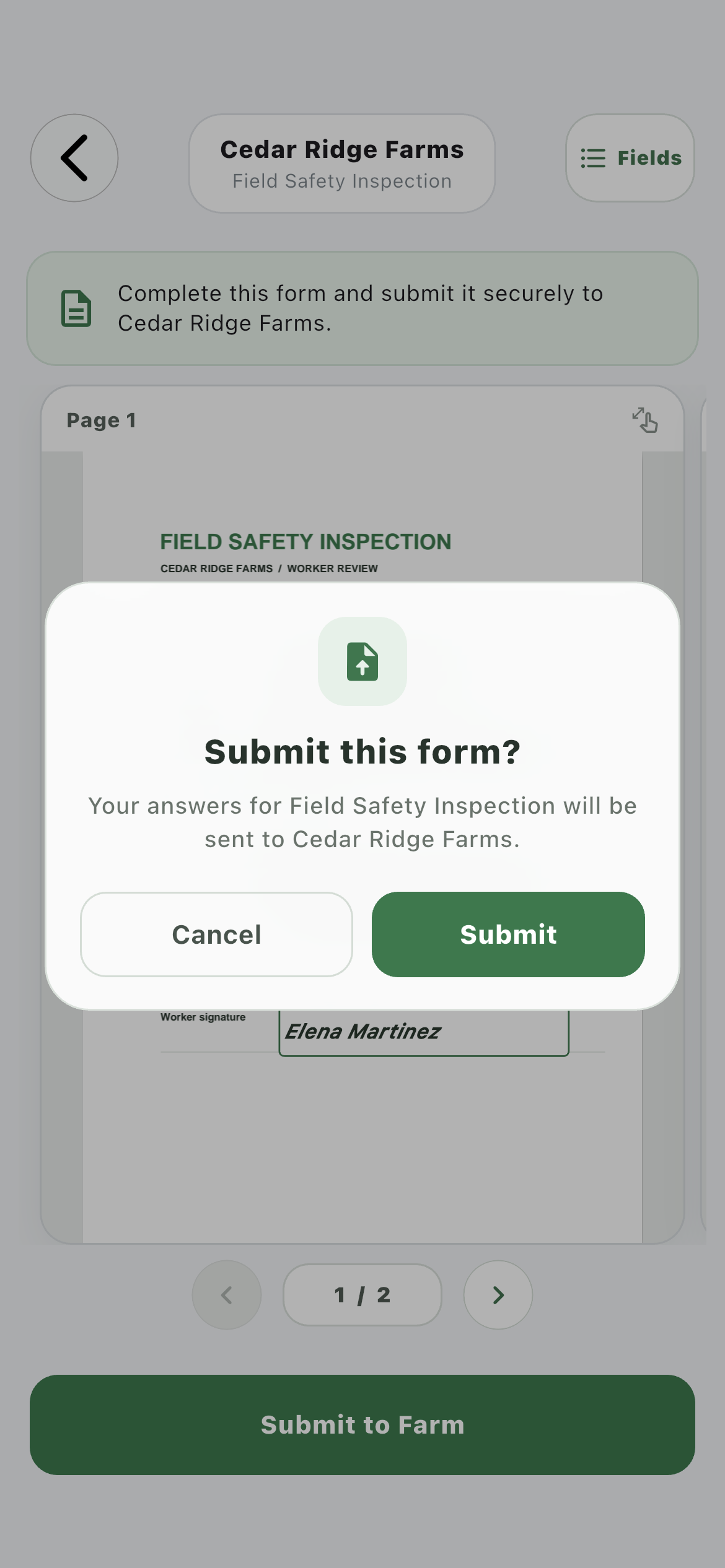
Submission confirmation03
The worker confirms the template and destination farm before the response is sent.
04 · Return
Send farm-only fields back for recursive completion.
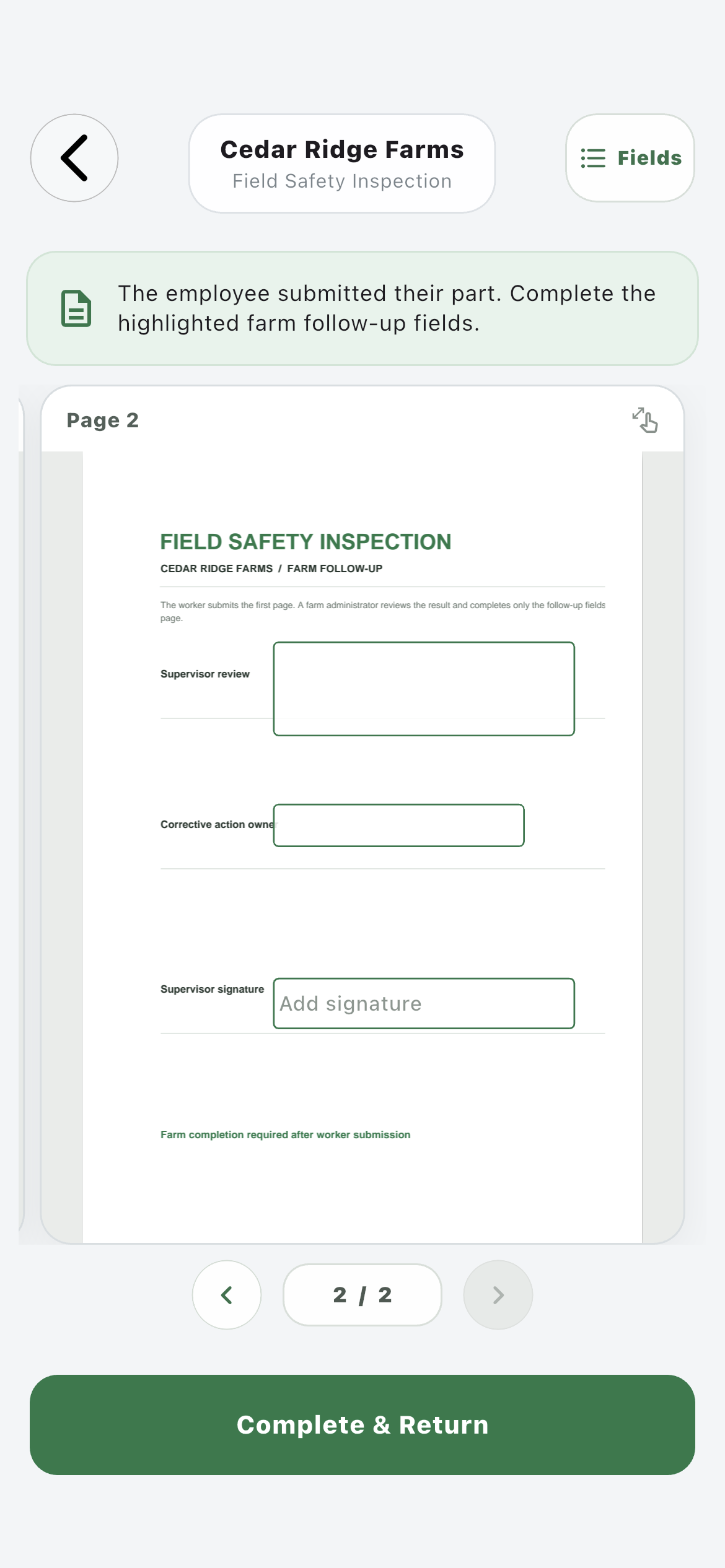
When a template contains recursive fields, the worker cannot edit them. Their submission becomes Needs Work for the farm, which reviews the employee portion and completes only the remaining farm fields.
Farm follow-up01
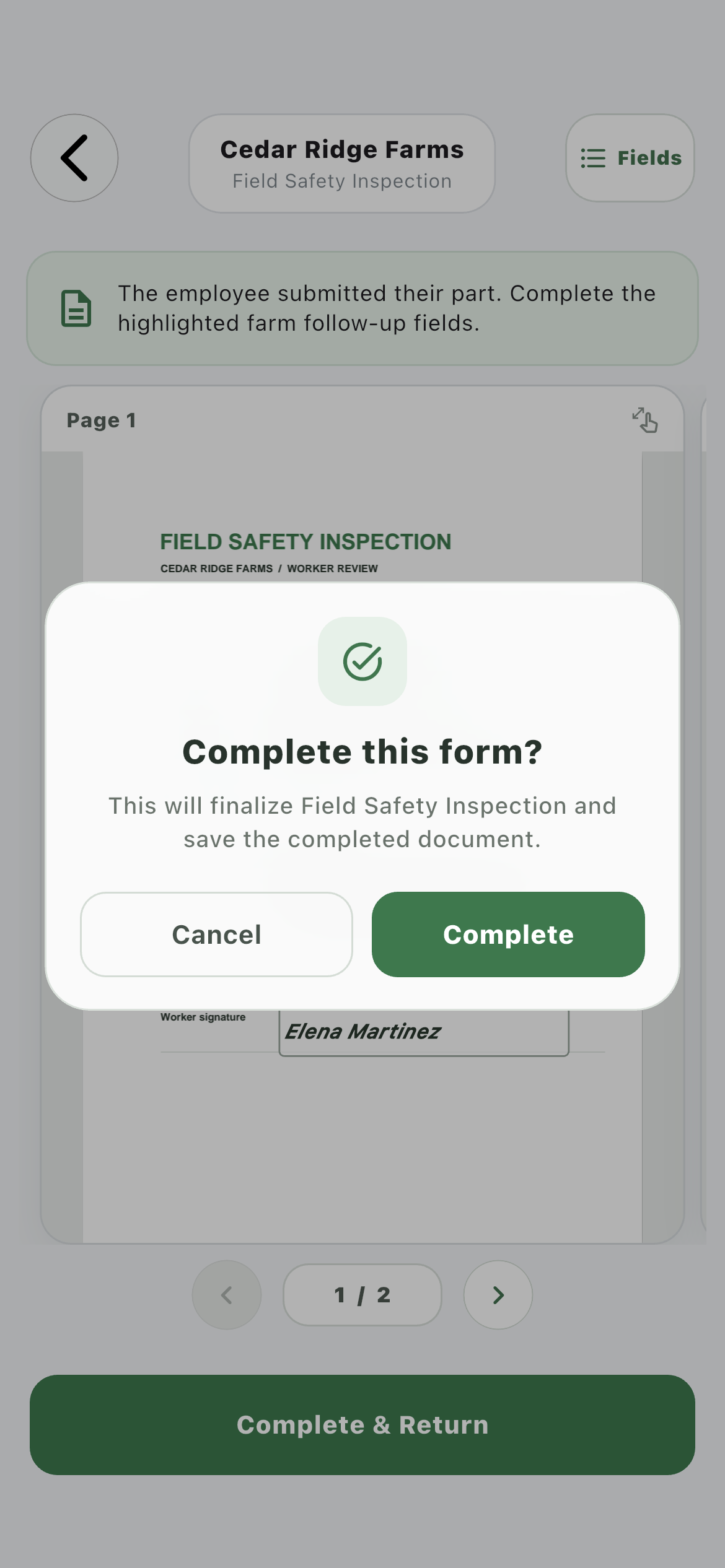
The employee’s answers remain visible while the farm is told exactly which highlighted fields still require work.
Final confirmation02
The farm confirms completion before Farmroute finalizes and retains the document.
05 · Retain
Keep one completed, farm-owned PDF with the worker record.
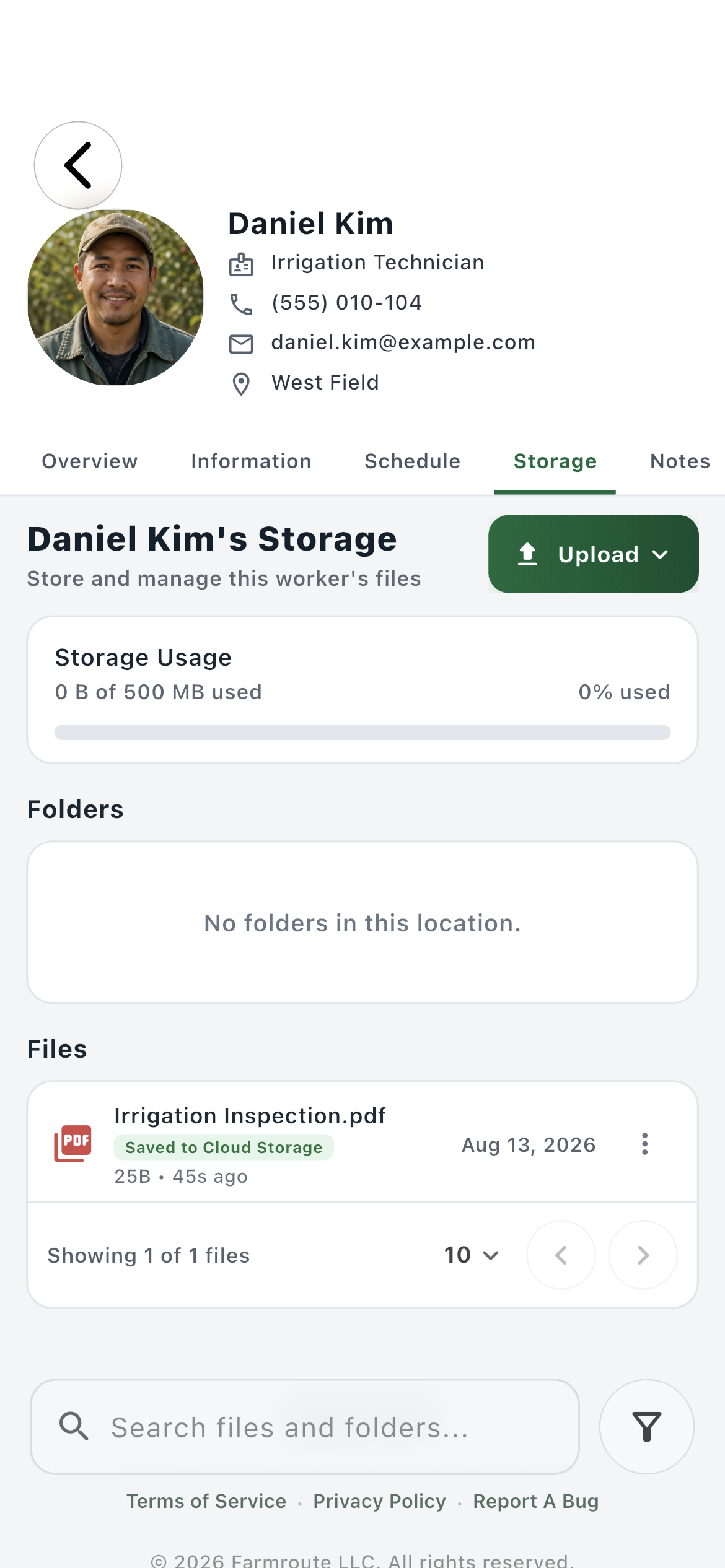
After the last required stage, Farmroute renders the answers and signatures into the PDF and stores the finished record under the submitting worker—not in the employee’s personal storage and not inside technical UUID folders.
Worker storage01
Completed forms belong to the farm record and live under the worker’s Template Submissions folder using the FRW number and template name.
How it works in practice
Built around the workday.
01
Records
Template, assignment, and submission are different records.
The template defines reusable pages and fields. An assignment is one request sent to one worker. The submission is that request’s completed output. Keeping those records separate allows the same template to be assigned repeatedly without replacing prior work.
One reusable source
Independent worker assignments
Immutable completed outputs
02
Ownership
Every field has a responsible stage.
Normal fields belong to the worker stage. Recursive fields belong to the farm stage and stay unavailable to the employee. Farmroute advances the assignment only after the responsible party confirms submission.
Worker fields first
Farm-only recursive fields second
No accidental cross-stage edits
03
Entry
Document context and fast data entry coexist.
Workers can answer directly where the field appears on the PDF, then use the Fields panel for a simpler list when typing several answers. Both interfaces write to the same form state and preserve the original page geometry.
Bounded page canvas
Page-turn navigation
Equivalent field-list input
04
Signatures
A signature is more than styled text.
Farmroute retains the signature method, signer name, consent version, client timestamp, and drawn image when applicable. The final PDF preserves the signature’s aspect ratio rather than stretching it to fill the mapped box.
Typed or drawn method
Electronic-signature consent
Signature metadata and image
05
Delivery
Notifications point to the work; they are not the record.
An assignment can notify the worker, and a returned recursive form can notify the farm with a Needs Work destination. The assignment and completed document remain in the database and storage even if a real-time or push notification is missed.
In-app and eligible push delivery
Tasks remains the work destination
Incremental sync after reconnect
06
Retention
Final files follow a predictable farm-owned path.
Completed output is stored under the submitting worker in Template Submissions and named with the FRW worker number plus the template name. Internal assignment-source objects are not shown as user folders.
Worker → Template Submissions
FRW-# plus template name
No duplicate-extension or UUID-folder clutter
Roles and responsibility
Who does what.
Farm profile
Create the request and own the finished record.
The farm maps the source, sends an independent assignment to an eligible worker, handles recursive follow-up, and receives the final farm-owned PDF in the correct worker record.
Reusable page and field mapping
Farm-scoped worker assignment
Recursive completion and retention
Employee profile
Complete only the portion requested by the farm.
The employee opens the named farm request in Tasks, fills the actual paged document or its field list, signs, confirms, and submits without needing to clock into a shift first.
Forms available off the clock
No access to recursive farm fields
Clear farm identity and submission status
Complete workflow
From start to finish.
01
Farm
Add the source document
Place the farm’s PDF in Templates and verify every page that should be part of the reusable form.
02
Farm
Map the response fields
Position text, date, checkbox, signature, initials, and other supported fields on the correct page.
03
Farm
Mark recursive follow-up
Reserve fields that should be completed by a farm administrator after the worker returns their portion.
04
Farm
Assign a fresh copy
Choose a worker with a current relationship to that farm. The assignment receives its own identity and does not mutate earlier submissions.
05
Employee
Open the form in Tasks
The request appears under Forms with the sending farm’s name and stays accessible even when normal operational tasks require clock-in.
06
Employee
Fill, sign, and confirm
Use the document pages or Fields panel, add the electronic signature, and confirm the destination before submission.
07
System
Route the next stage
If there are no recursive fields, the document can finalize. Otherwise, the farm receives a Needs Work state linked to the remaining fields.
08
Farm
Complete recursive fields
Review the employee answers, enter only the farm-owned follow-up, and confirm final completion.
09
System
Render and retain the final PDF
Embed all answers and signatures, preserve signature geometry and metadata, then store one farm-owned file in the submitting worker’s Template Submissions folder.
Questions and answers
Frequently asked questions.
What is a farm template form in Farmroute?
A template form is a reusable field map placed over a farm’s existing PDF. The farm can assign a fresh copy to a worker, collect the response, and retain a completed PDF without rebuilding the document as a generic web survey.
Can the same PDF template be assigned more than once?
Yes. Every assignment is a separate request with its own identity, answers, status, and completed output, so later requests do not replace earlier submissions.
Does an employee have to clock in before completing a template form?
No. Assigned forms appear in the Forms section of Tasks and remain available off the clock. Other operational tasks can still require an active clock session.
What are recursive fields on a Farmroute form?
Recursive fields are follow-up fields reserved for the farm. The employee completes and submits their portion first, then the farm receives a Needs Work stage and completes only the remaining recursive fields.
Can a worker type answers without editing the PDF canvas?
Yes. The employee can fill fields directly on the document or open the Fields panel for a structured list. Both views update the same assignment answers.
How are electronic signatures stored?
Farmroute retains the signature method, signer name, consent version, timestamp, and drawn image when applicable, and embeds the visible signature in the completed PDF while preserving its aspect ratio.
Where does the completed employee form go?
After all required stages are complete, the final farm-owned PDF is stored under that worker’s Template Submissions folder and named with the worker’s FRW number and the template name.
What happens if a form notification is missed or the device is offline?
The notification is only a delivery cue. The assignment remains in the database, appears in Tasks after synchronization, and reconnecting devices use incremental sync to recover missed changes.
Get started
Build your operation with Farmroute.
We pride ourselves on transparency. No need to call for a quote.