WorkforceProduct guide

Tasks

Farmroute tasks turn repeatable agricultural work into guided mobile workflows. Farms can combine instructions, acknowledgements, required or optional inputs, worker identity, quantities, dropdowns, photos, files, scans, signatures, and piece-rate actions—then monitor active work and inspect the resulting data from the same task template.

  • Visual workflow builder
  • Required and optional steps
  • Eligible worker assignment
  • Text, number, quantity, date and time inputs
  • Dropdown and multi-select choices
  • Photos, files, QR and barcode scans
  • Acknowledgements and signatures
  • Piece-rate payroll actions
  • Live activity and completion history

Inside the app

See the workflow.

Actual Farmroute screens from the farm and employee demo accounts.

01 · Create

Build the reusable task definition.

The template record, worker instructions, and required acknowledgements are distinct parts of the task—not one generic checklist screen.

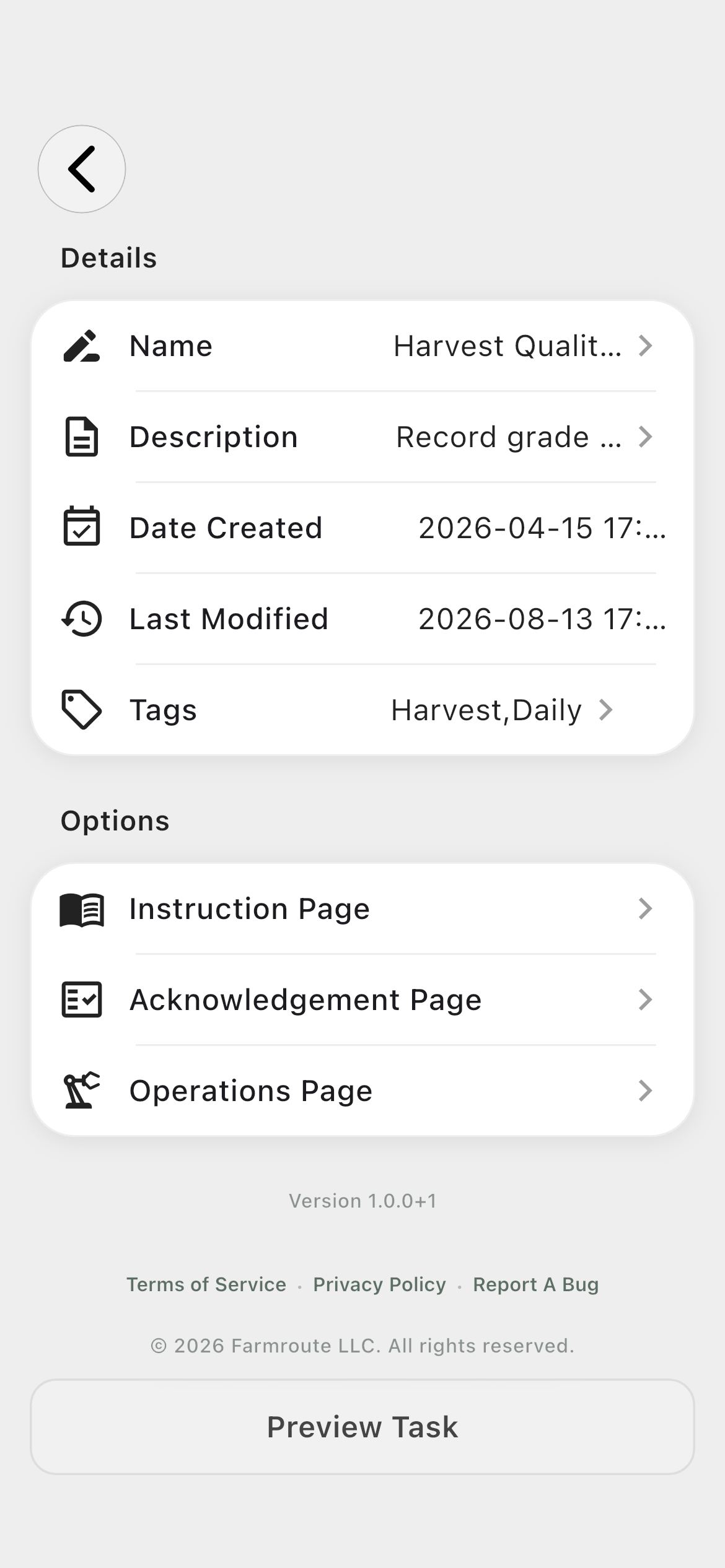
Template setup01
Farmroute Harvest Quality Count task template settings
Name and tag the reusable task, describe its purpose, and choose which setup and operations modules belong to it.
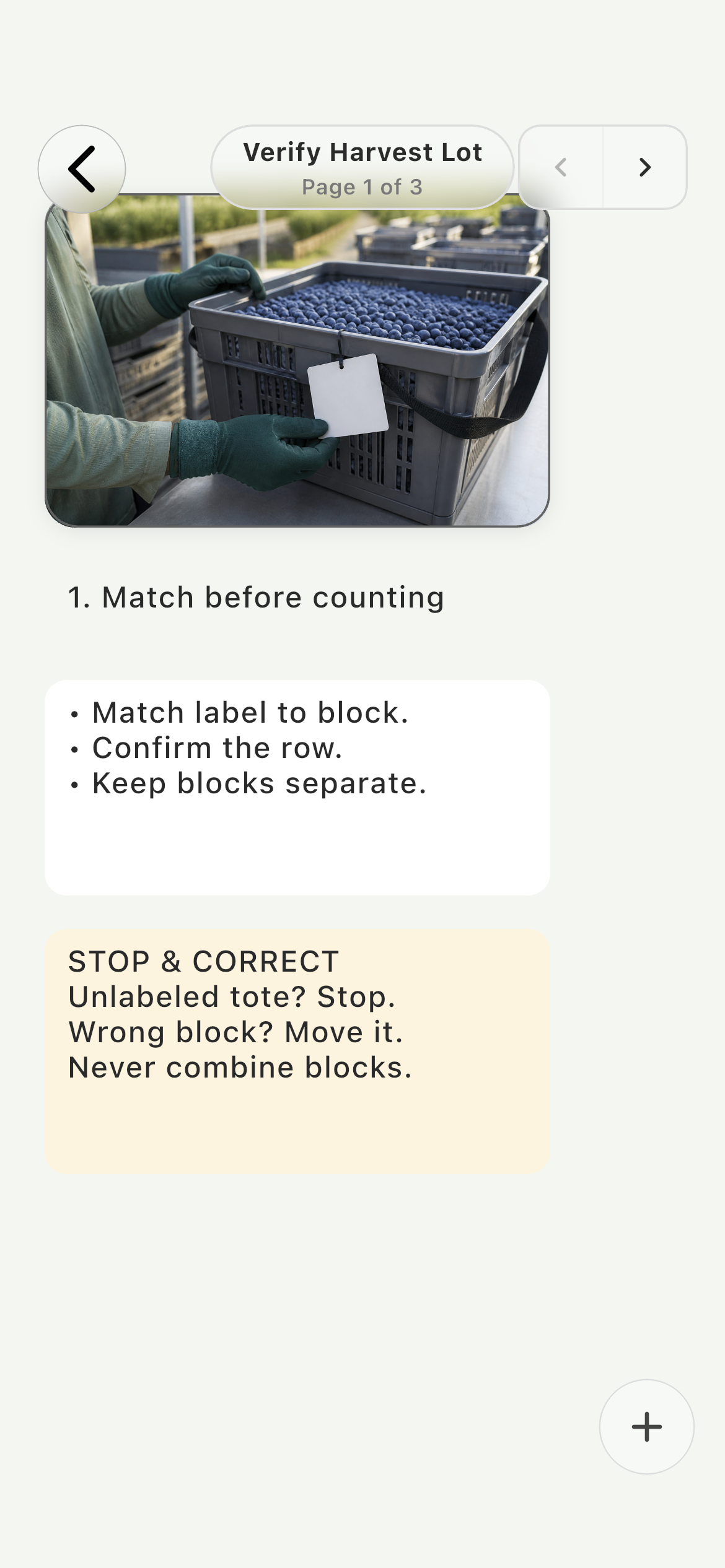
SOP · Verify the lot02
Farmroute visual SOP instruction page explaining how to verify a labeled blueberry harvest tote
Combine an original training image with concise, operational checks for the assigned block and row range.
SOP · Inspect quality03
Farmroute visual SOP instruction page explaining how to inspect and separate blueberry quality grades
Use another paged visual to explain Grade A, Grade B, and Cull before the worker records a result.
SOP · Document evidence04
Farmroute visual SOP instruction page showing evidence capture and final harvest-result checks
Finish the SOP with a visual example of evidence capture and clear checks for count, photo, block, and grade.
SOP acknowledgement05
Farmroute SOP acknowledgement preview with required harvest quality confirmations
Require the worker to confirm the important controls from the SOP before the operational workflow opens.
02 · Manage

Monitor templates and assign the right workers.

The farm can inspect current activity, manage reusable definitions, and choose eligible workers without entering the worker-facing task runner.

Farm task dashboard01
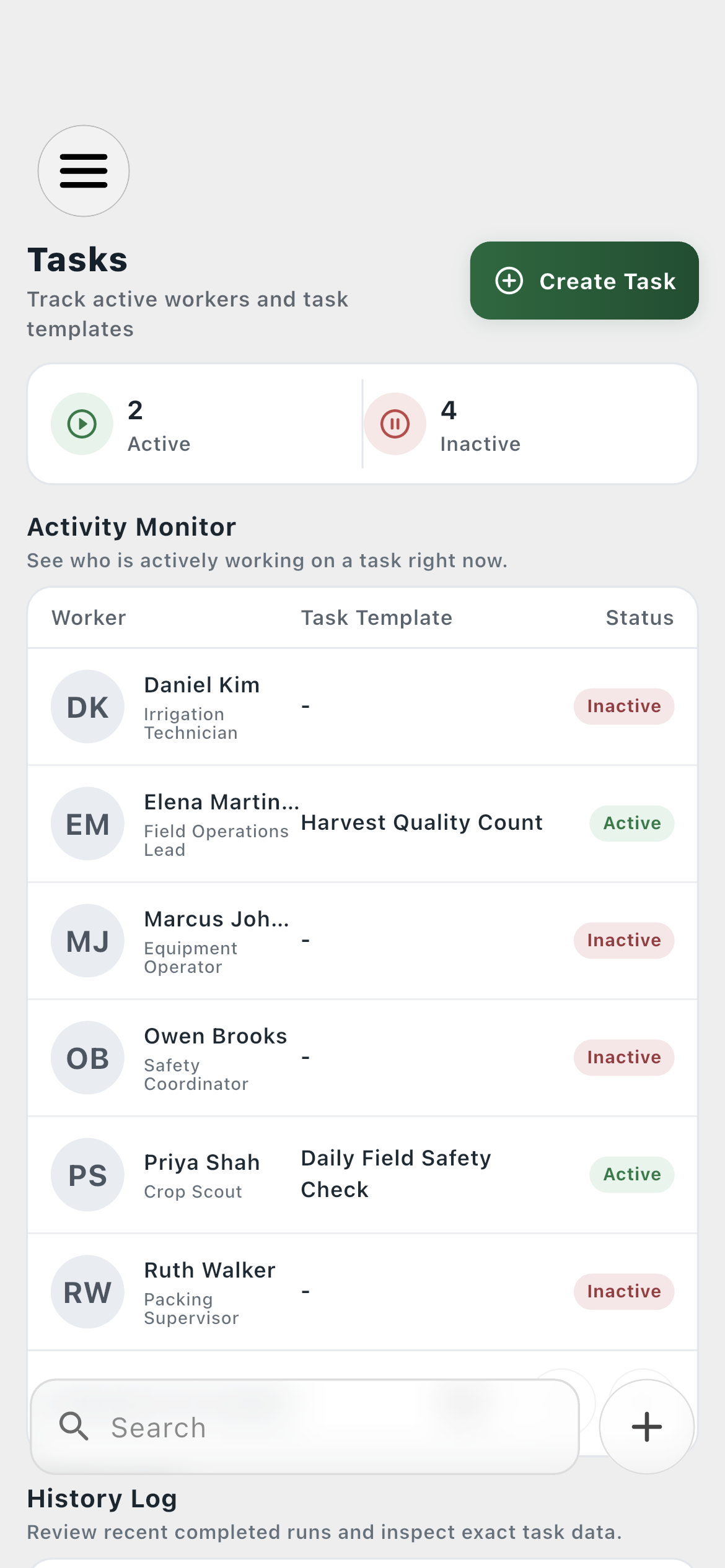
Farmroute farm task management dashboard with live worker activity
See worker activity, completed-run history, and the reusable template library from one operational page.
Template management02
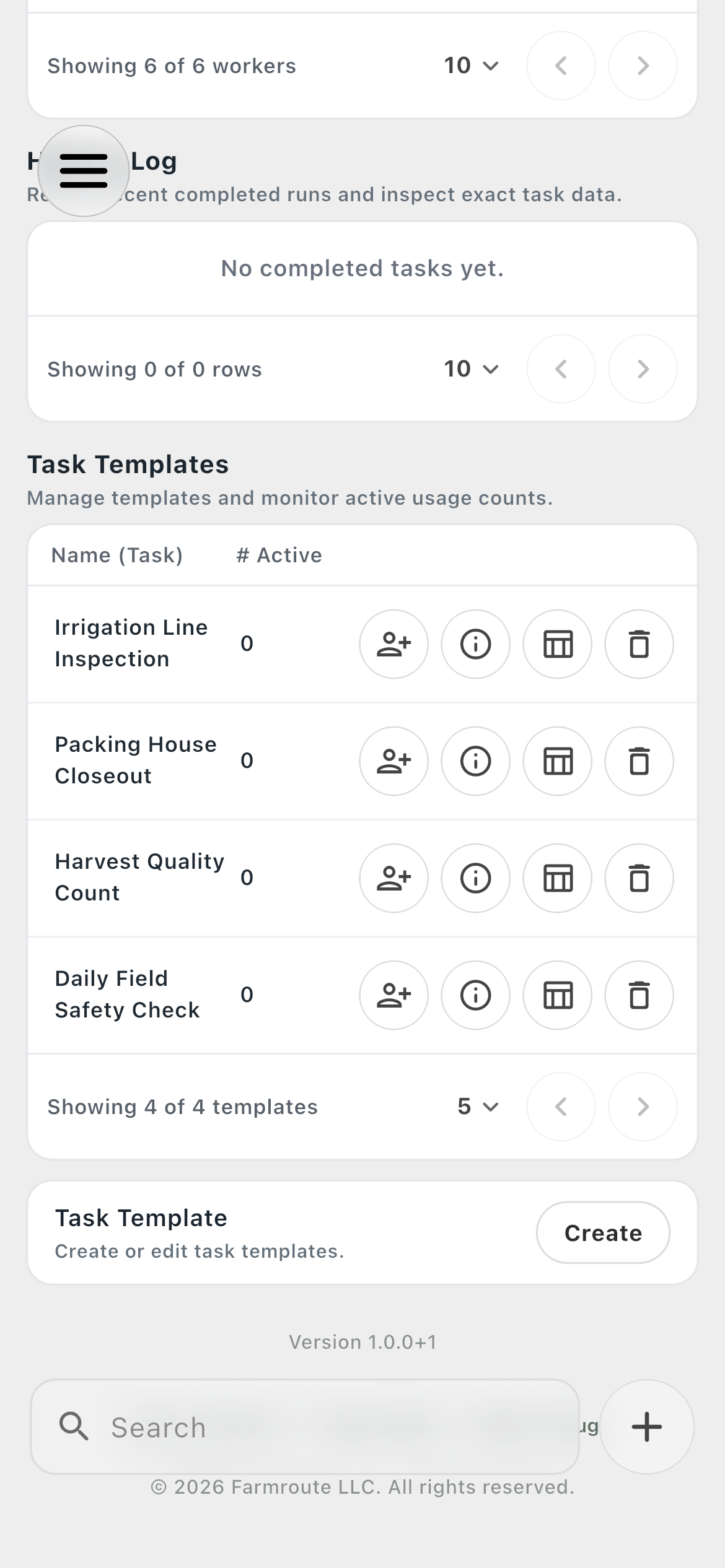
Farmroute task template management with assignment information data edit and delete actions
Open task information, collected data, editing, assignment, or deletion from the reusable-task table.
Assign Workers03
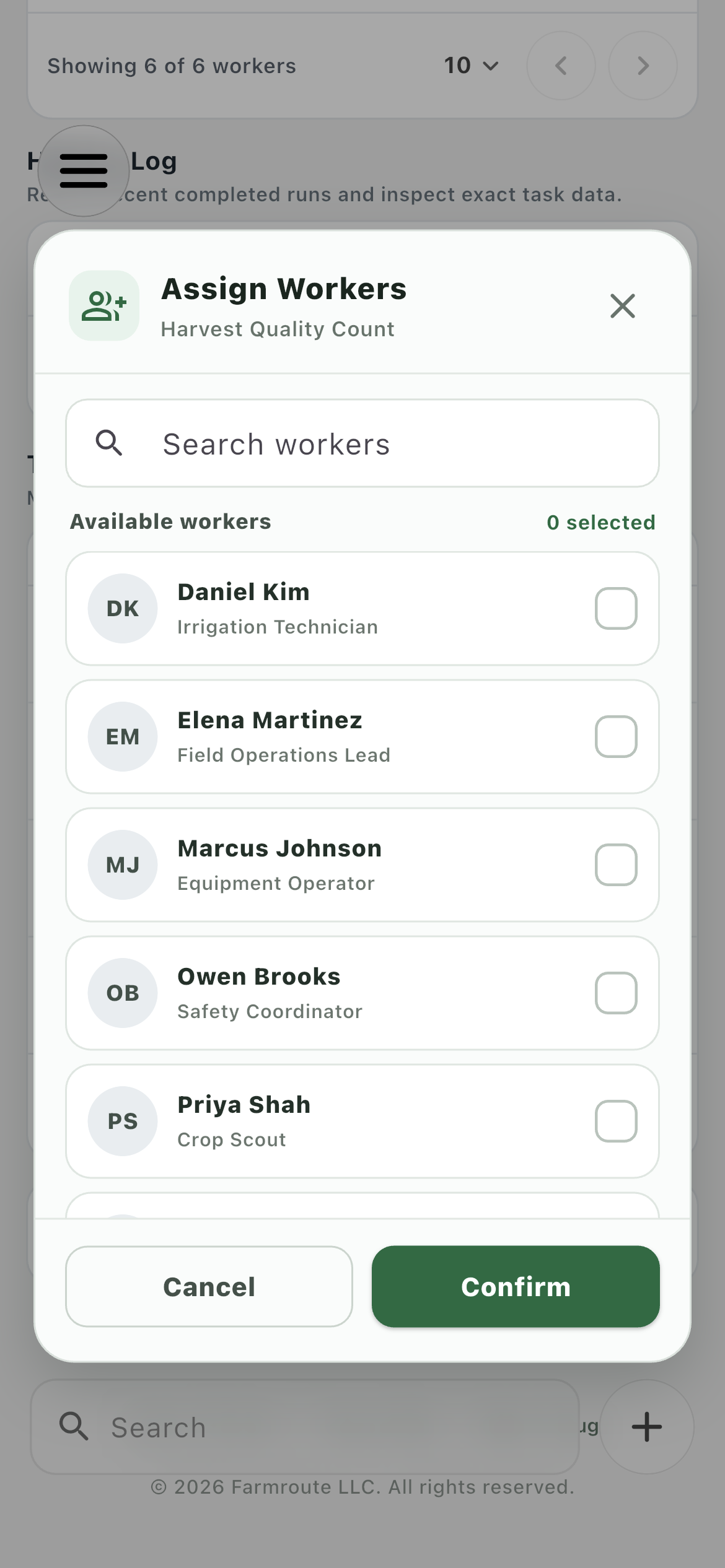
Farmroute Assign Workers dialog for a farm task template
Search the current farm workforce and assign or remove the template without exposing workers from another farm relationship.
03 · Workflow

Model the operation step by step.

The visual Operations Page connects structured inputs, evidence, identity, acknowledgements, and payable outputs in the order the work actually happens.

Operations graph01
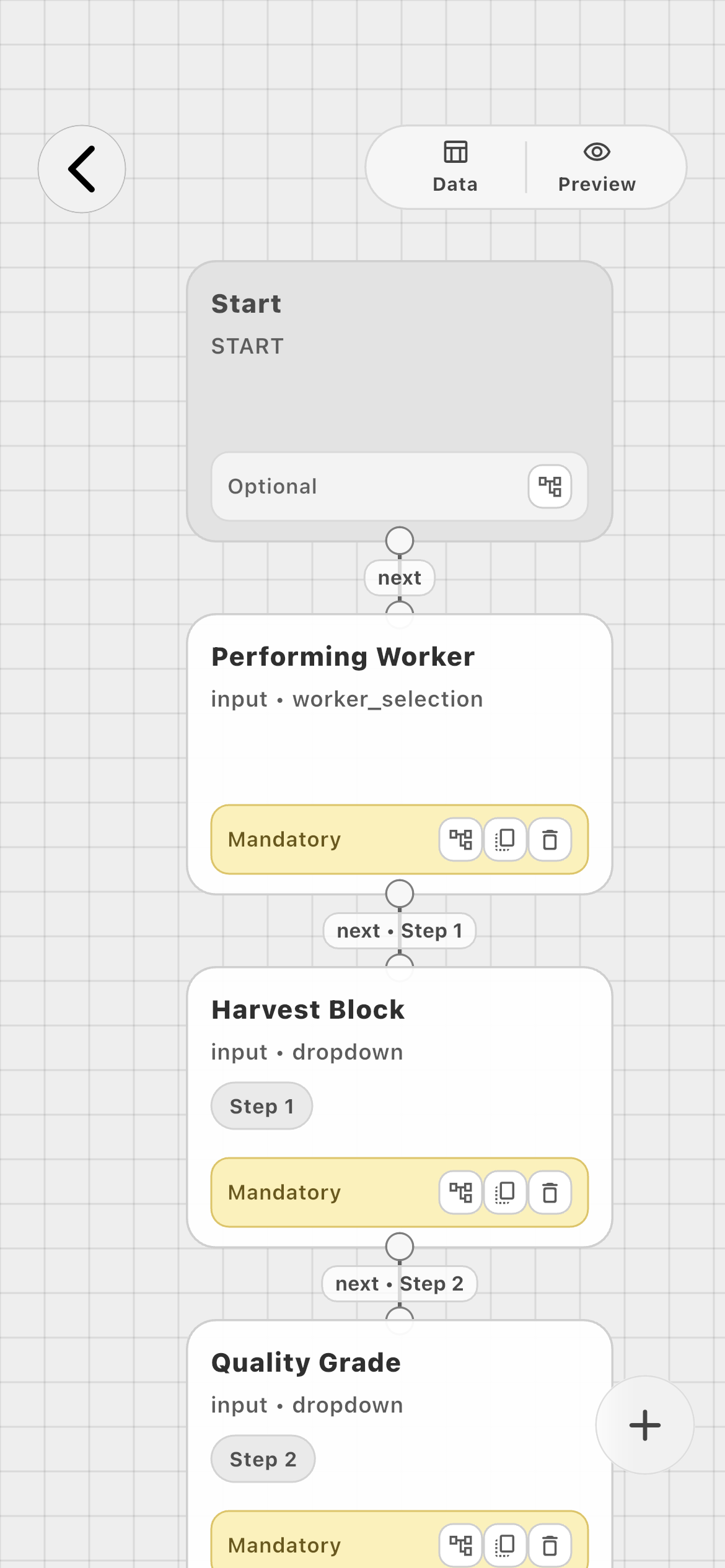
Farmroute visual workflow builder for a harvest quality farm task
Arrange a real sequence from Start through worker attribution, harvest block, quality grade, tote quantity, notes, evidence, confirmation, and submission.
Configurable blocks02
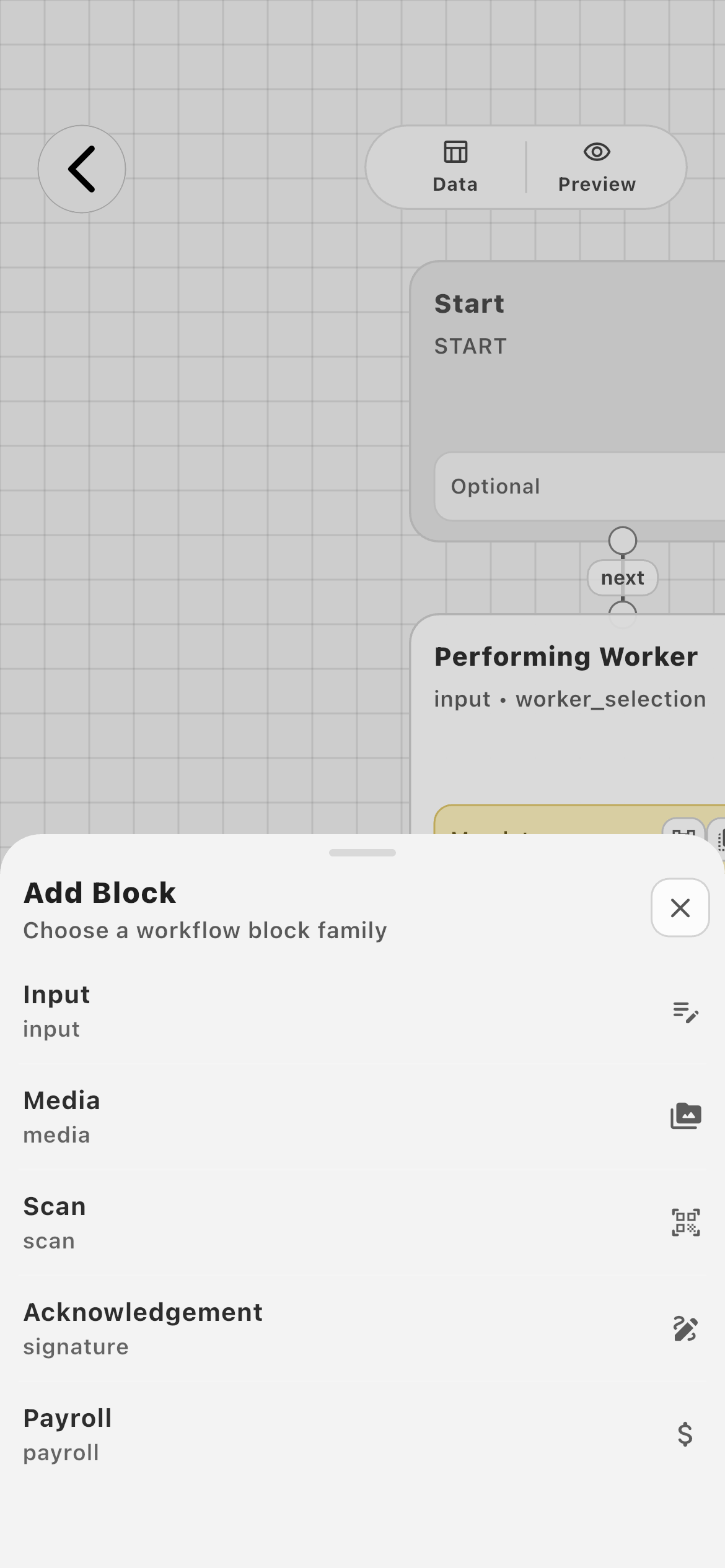
Farmroute Add Block menu for task input media scan acknowledgement and payroll actions
Add input, media, scan, acknowledgement, or payroll blocks instead of forcing every operation into the same generic checklist.
04 · Prepare

Give the worker context before the work begins.

Assignments, instructions, and acknowledgements appear as a focused progression before the operational data-entry sequence.

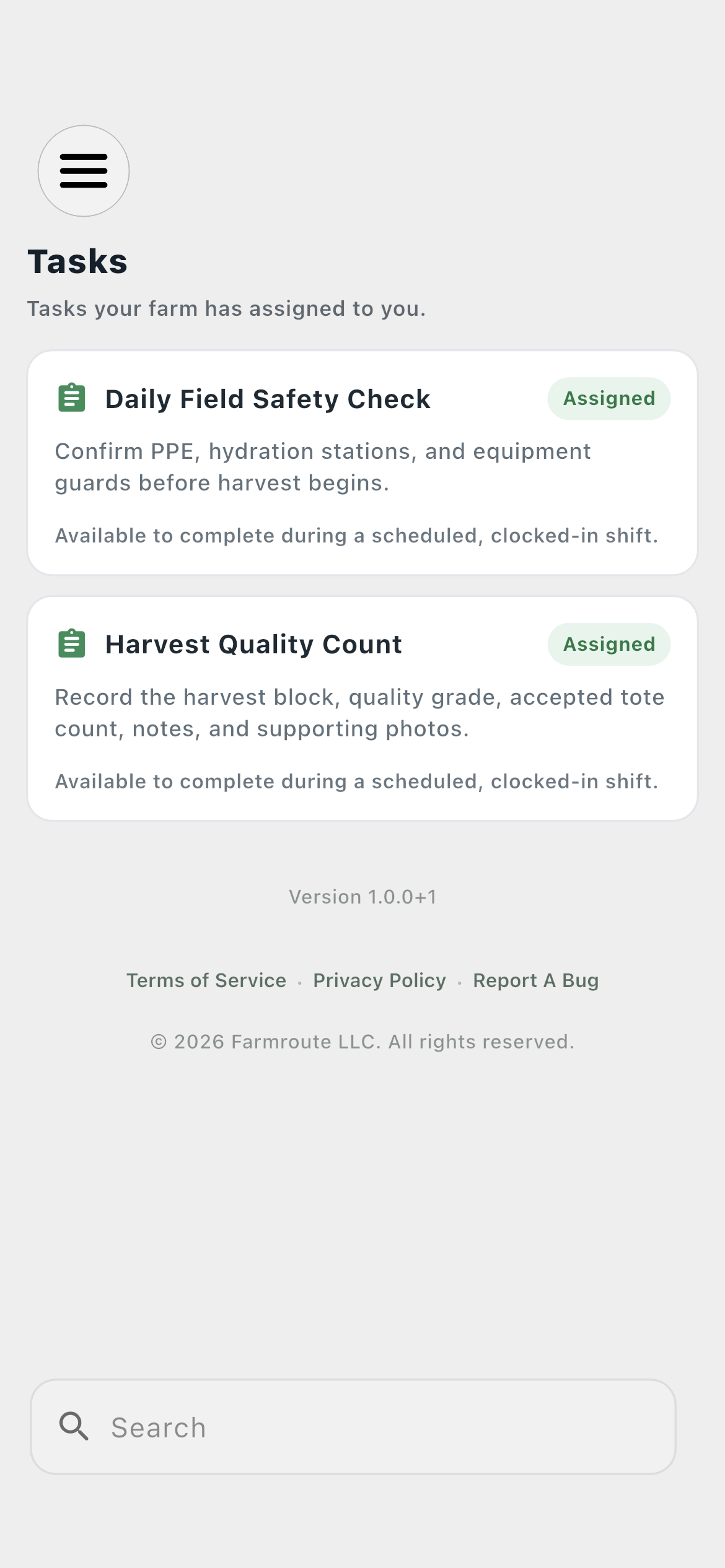
Worker assignments01
Farmroute employee assigned tasks for Cedar Ridge Farms
The employee sees only work assigned through the selected farm relationship, with operational work available during clocked-in time.
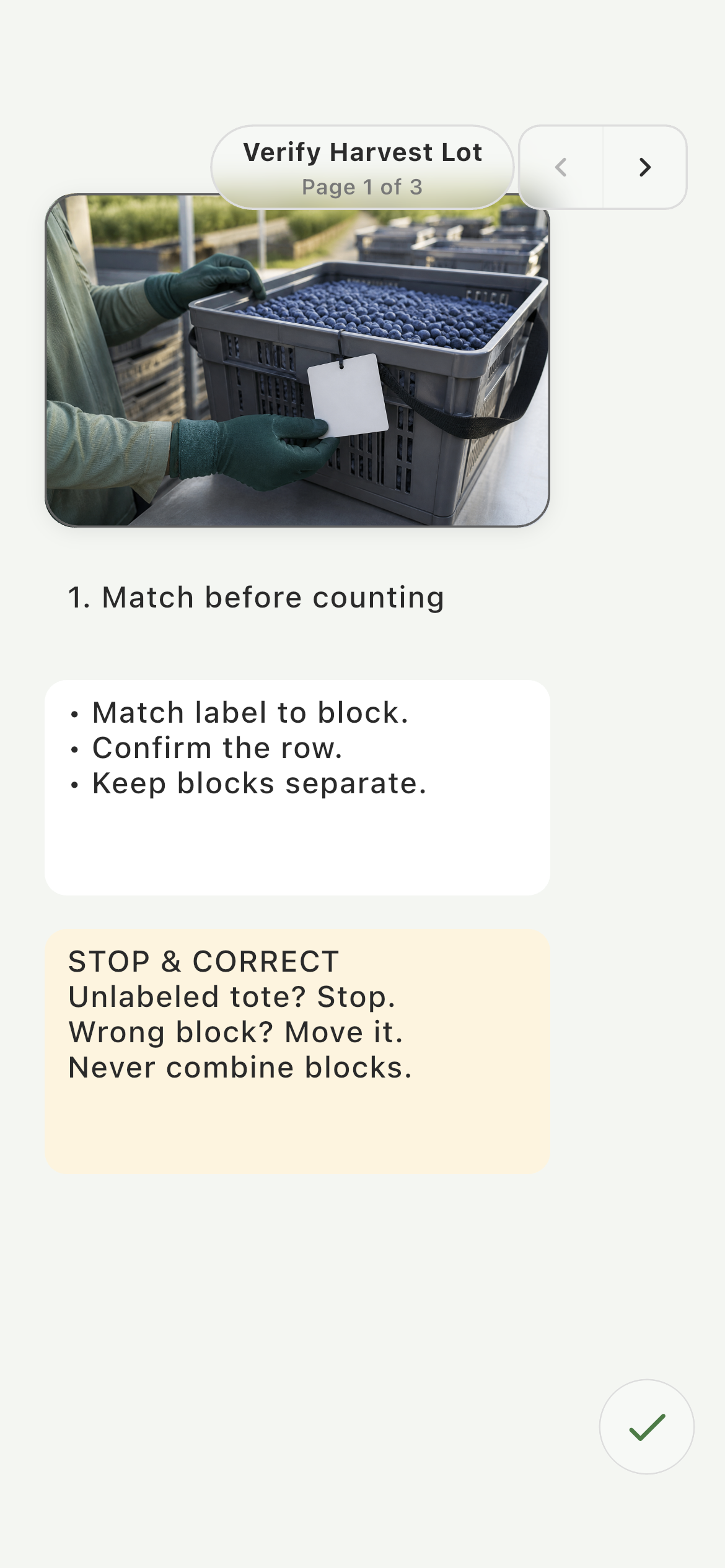
Verify the harvest lot02
Employee reviewing the visual tote-verification SOP for Harvest Quality Count
The worker reviews the real training visual and block-matching checks before entering task data.
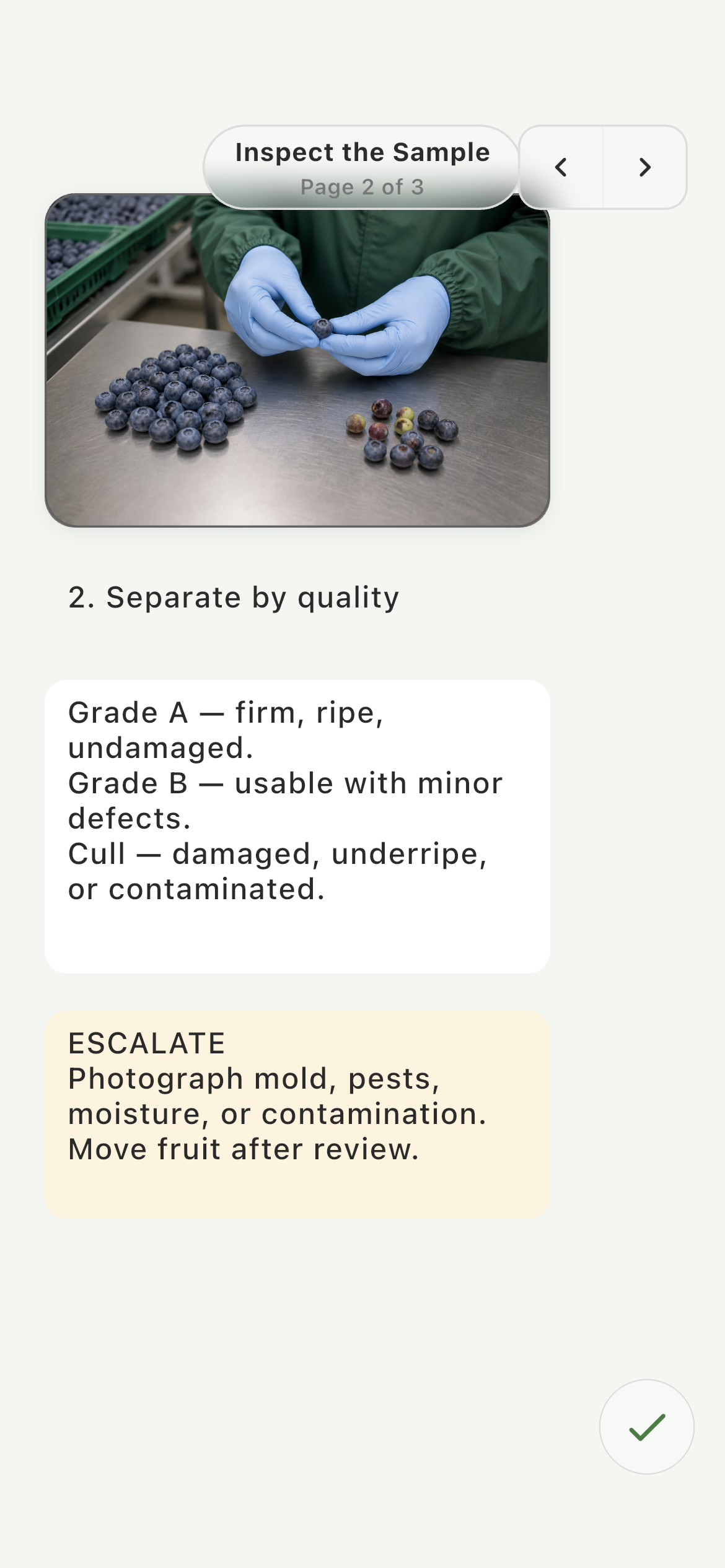
Inspect the sample03
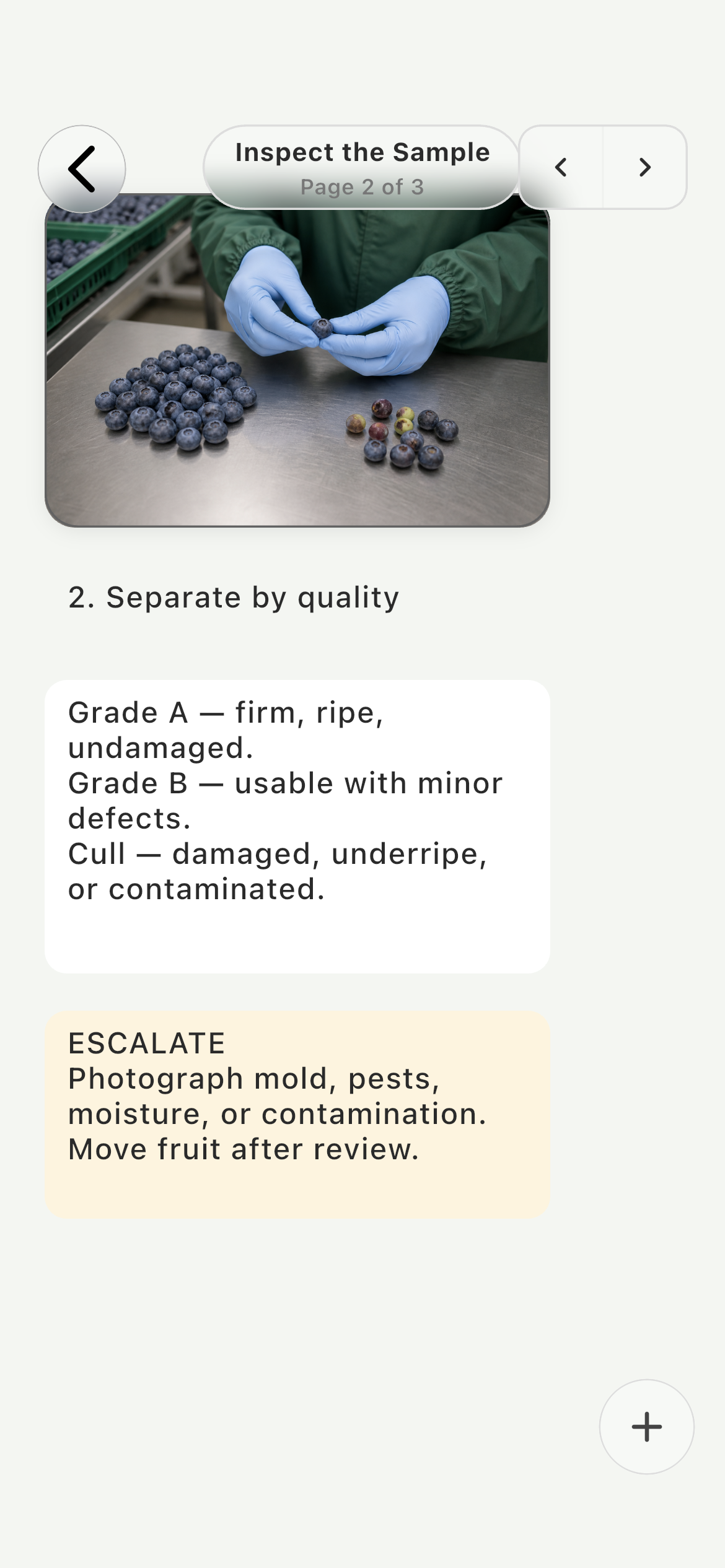
Employee reviewing the visual quality-inspection SOP for Harvest Quality Count
The next paged instruction shows the physical quality check and the farm’s grade definitions.
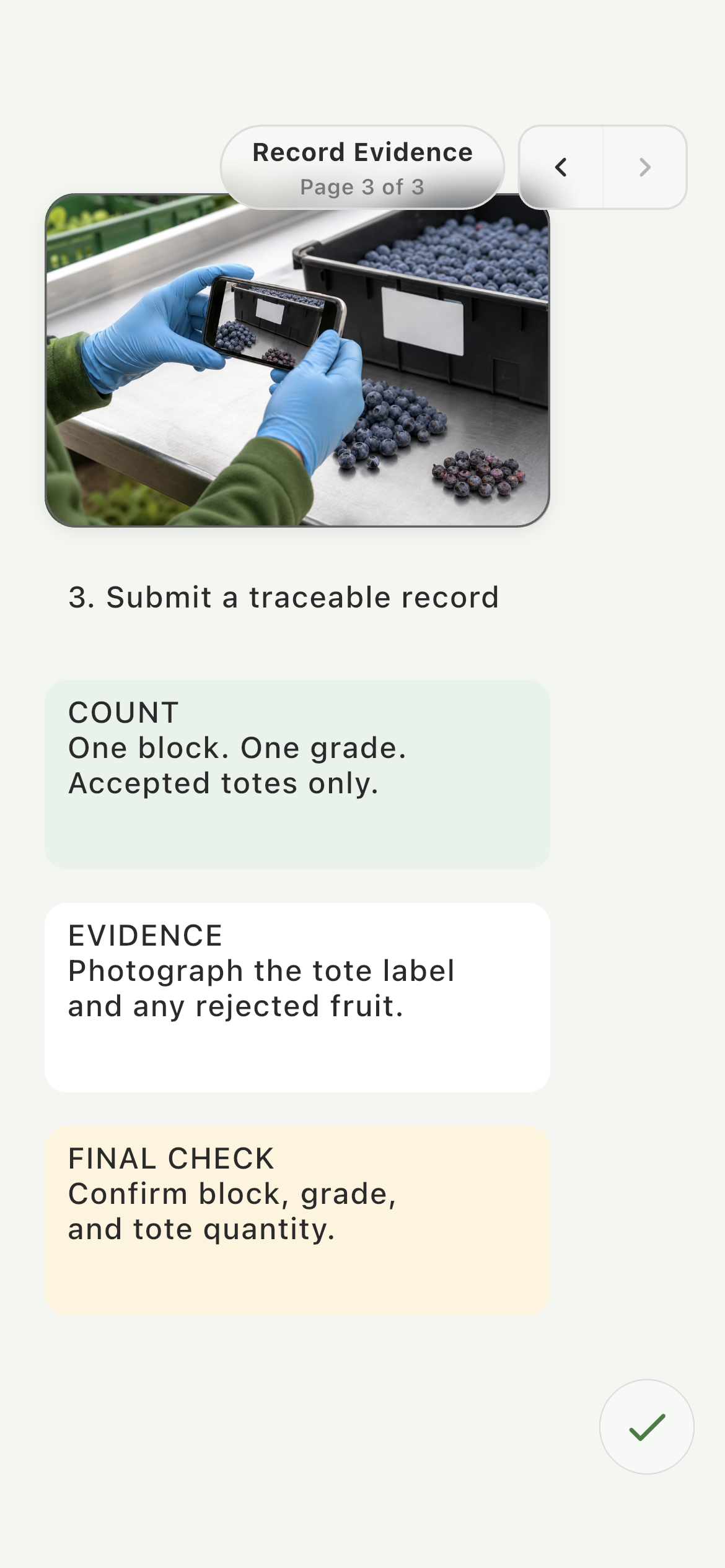
Document the result04
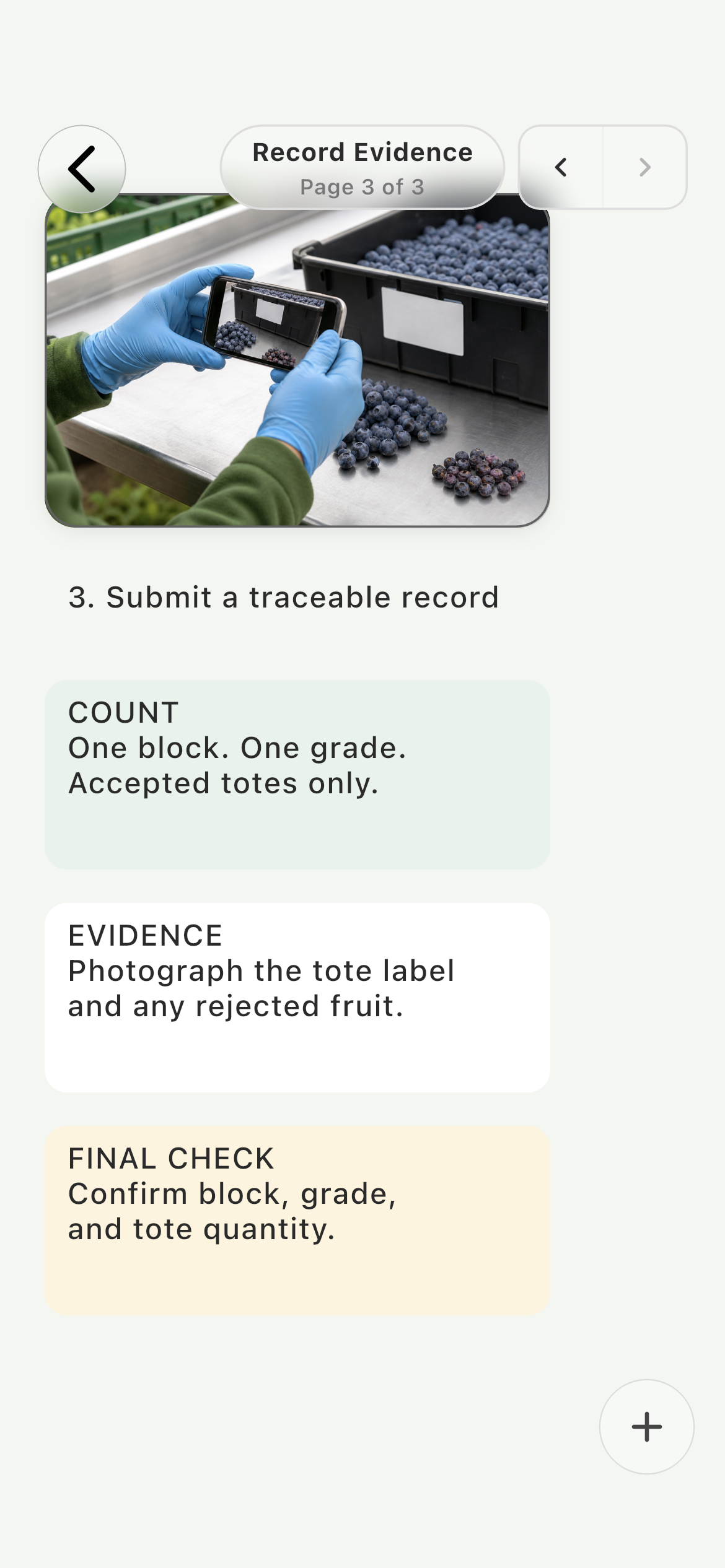
Employee reviewing the visual evidence-capture SOP for Harvest Quality Count
The final instruction shows exactly how to photograph evidence and verify the structured result before submission.
Confirm requirements05
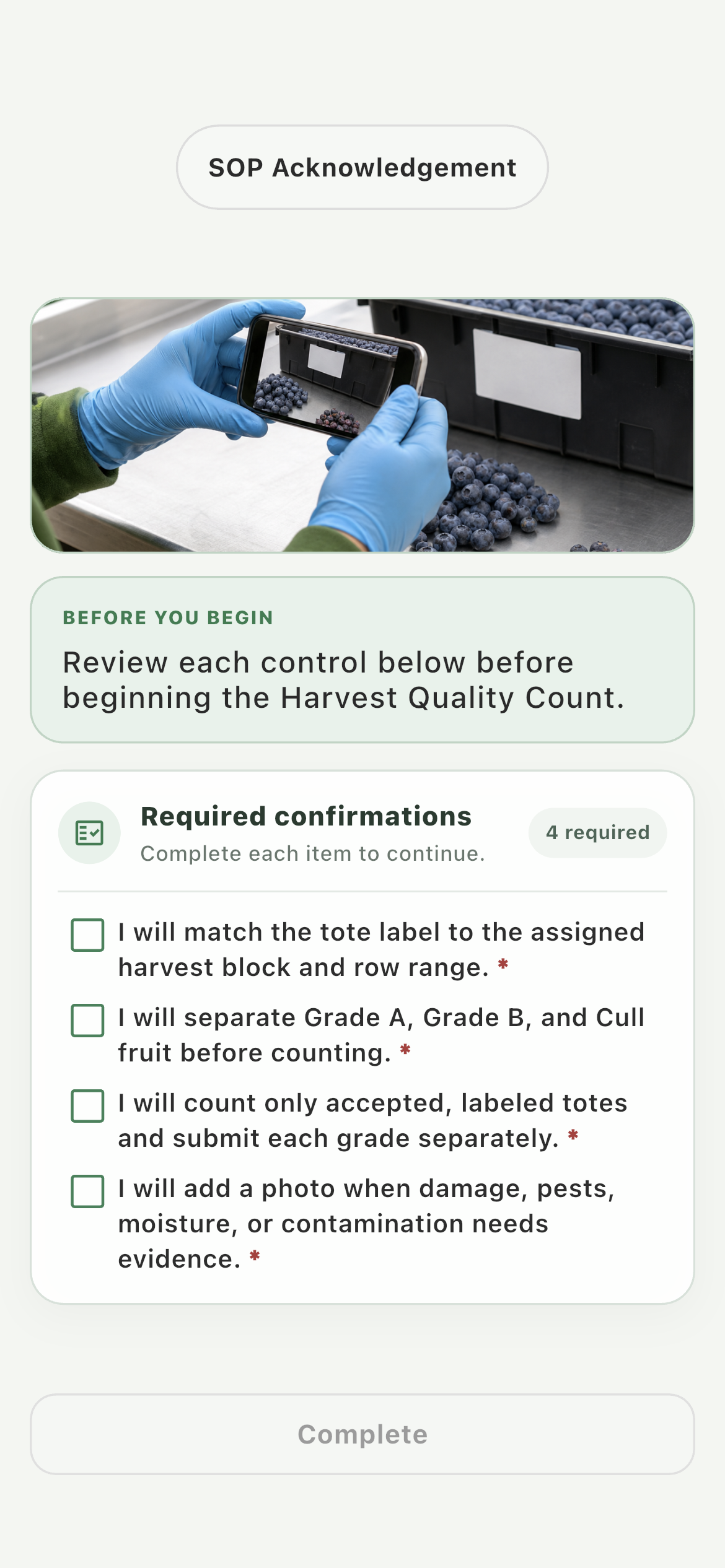
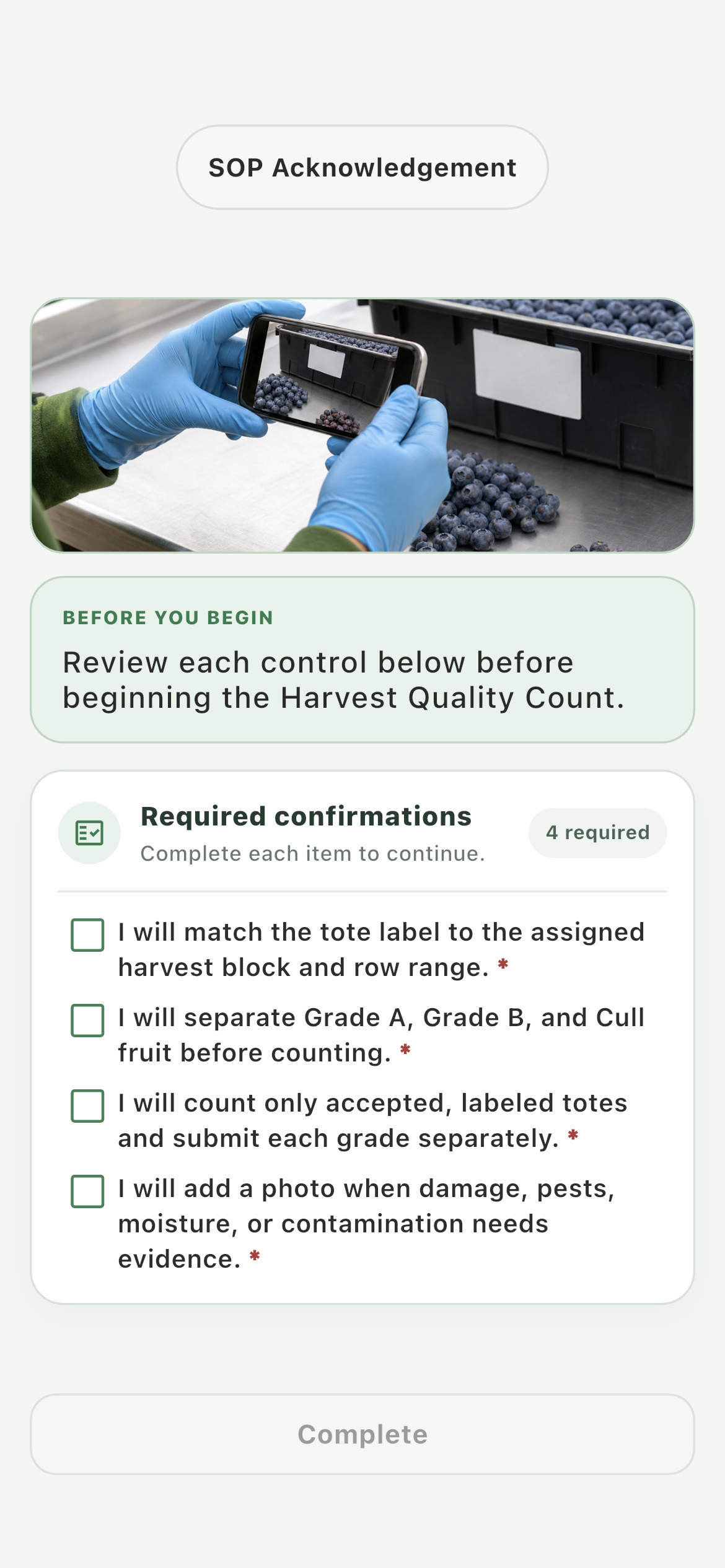
Employee reviewing required Harvest Quality Count acknowledgements
Required confirmations must be acknowledged before the worker can move into the task workflow.
05 · Complete

Capture the result one clear step at a time.

The employee follows the farm’s configured sequence without seeing the graph, setup controls, assignment tools, or collected-data administration.

Guided execution01
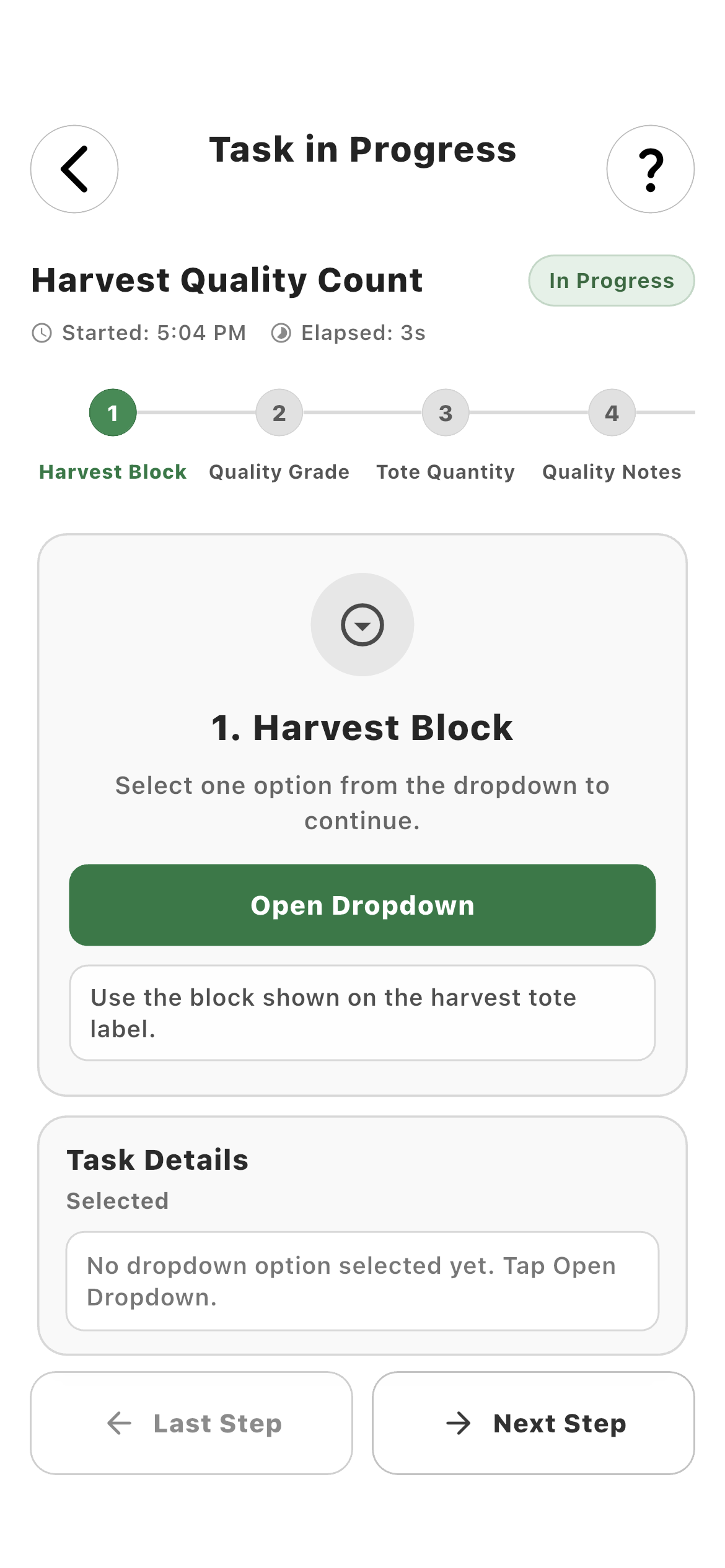
Employee completing the Harvest Block step of a customized farm task
Numbered progress, elapsed time, farm-authored notes, and Back or Next Step keep the worker oriented.
Farm-specific choices02
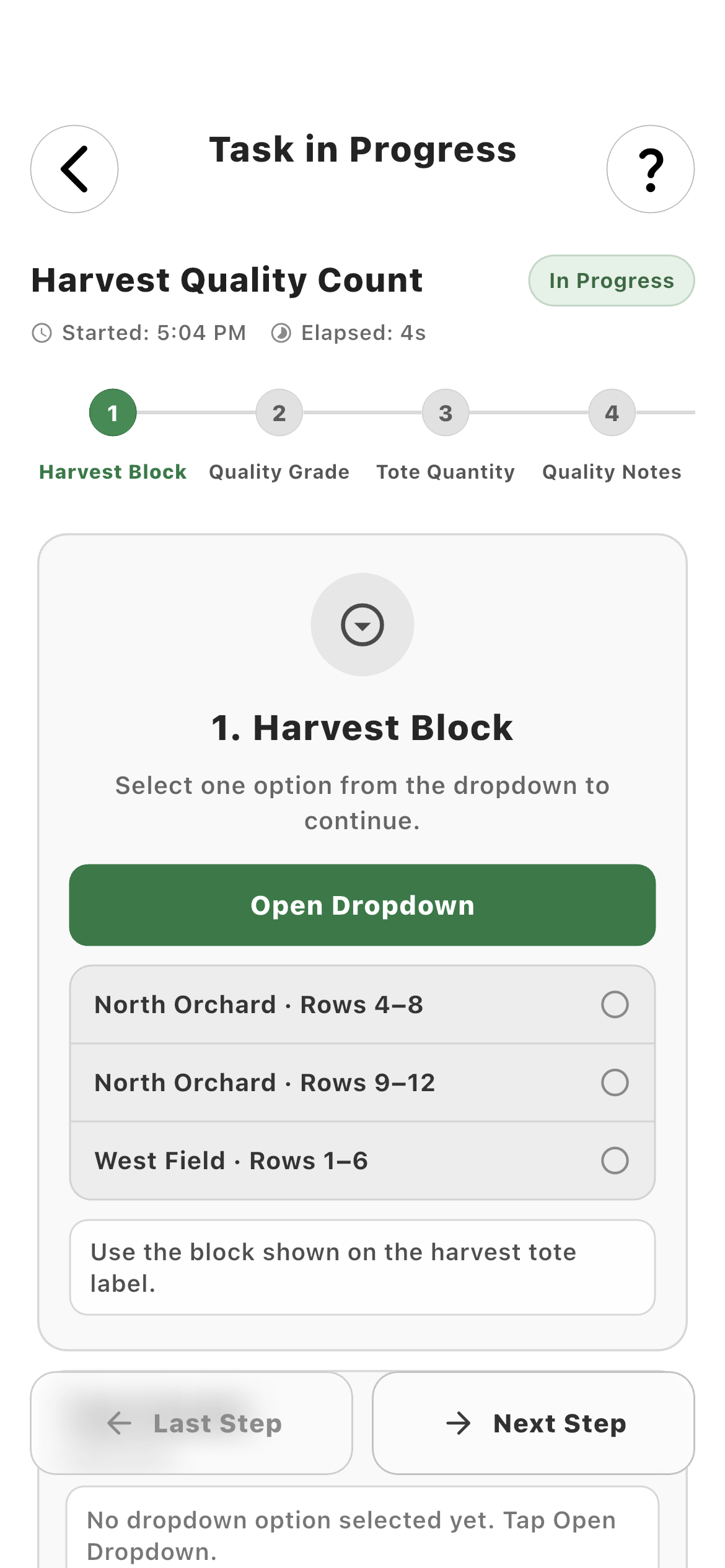
Employee choosing a specific orchard block in a Farmroute task
The farm supplies the exact orchard rows so the returned record is standardized instead of free-form guesswork.
Quality Grade03
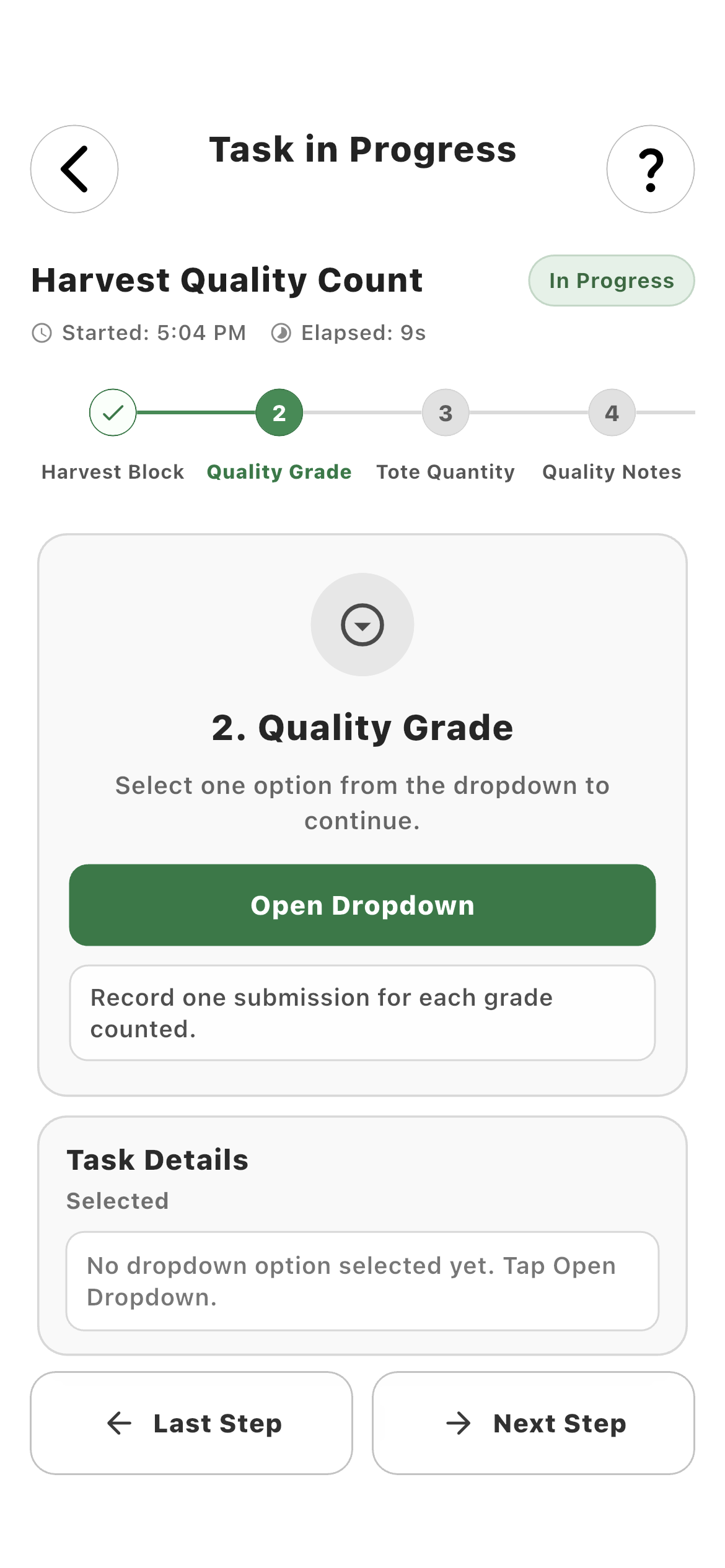
Employee continuing to the Quality Grade step of a harvest task
Completing one required step marks it finished and advances to the next configured value.
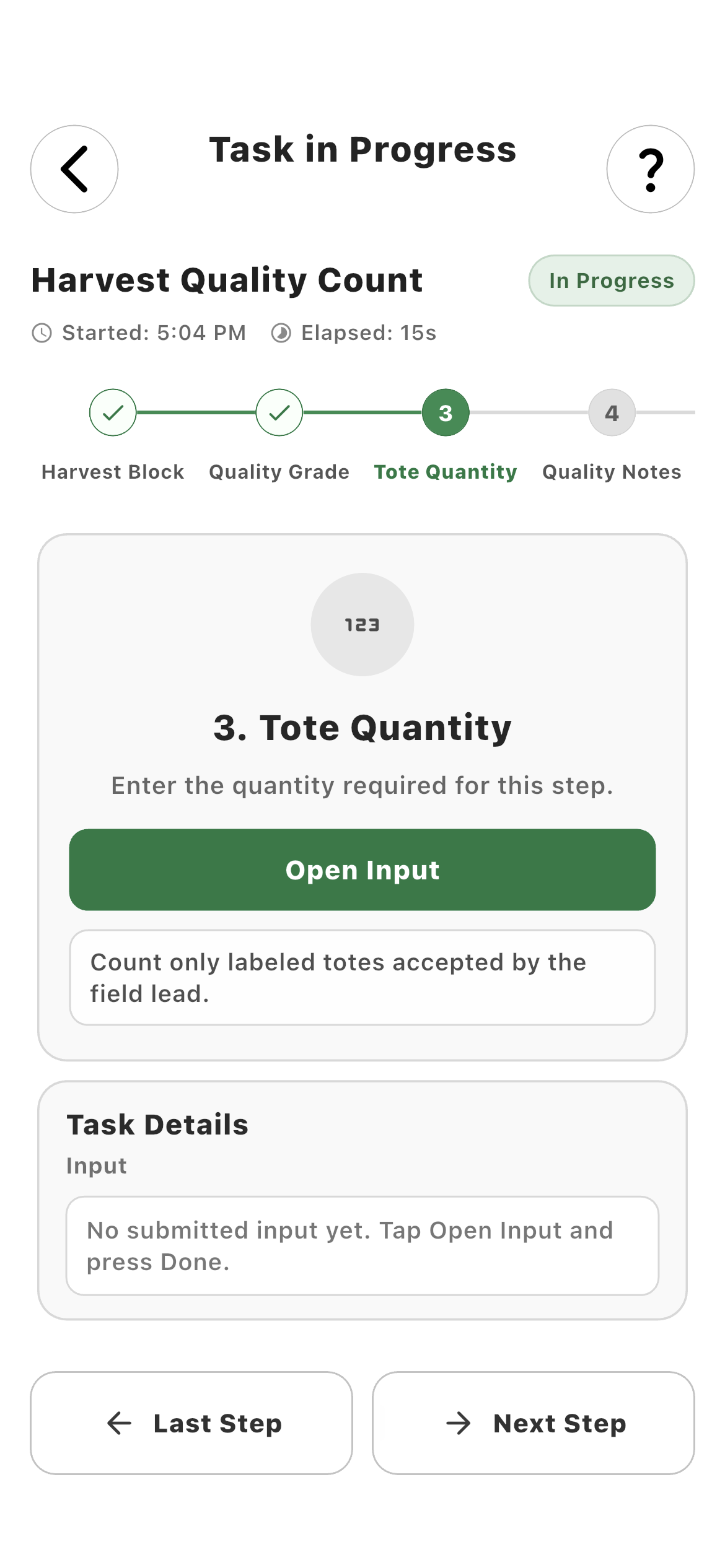
Tote Quantity04
Employee entering tote quantity in the Harvest Quality Count workflow
The next input captures the numeric operational result with the unit and validation selected by the farm.
06 · Review

Inspect structured task data after submission.

The task-specific data view keeps worker attribution, timestamps, and each captured output queryable instead of flattening a completion into a single checkmark.

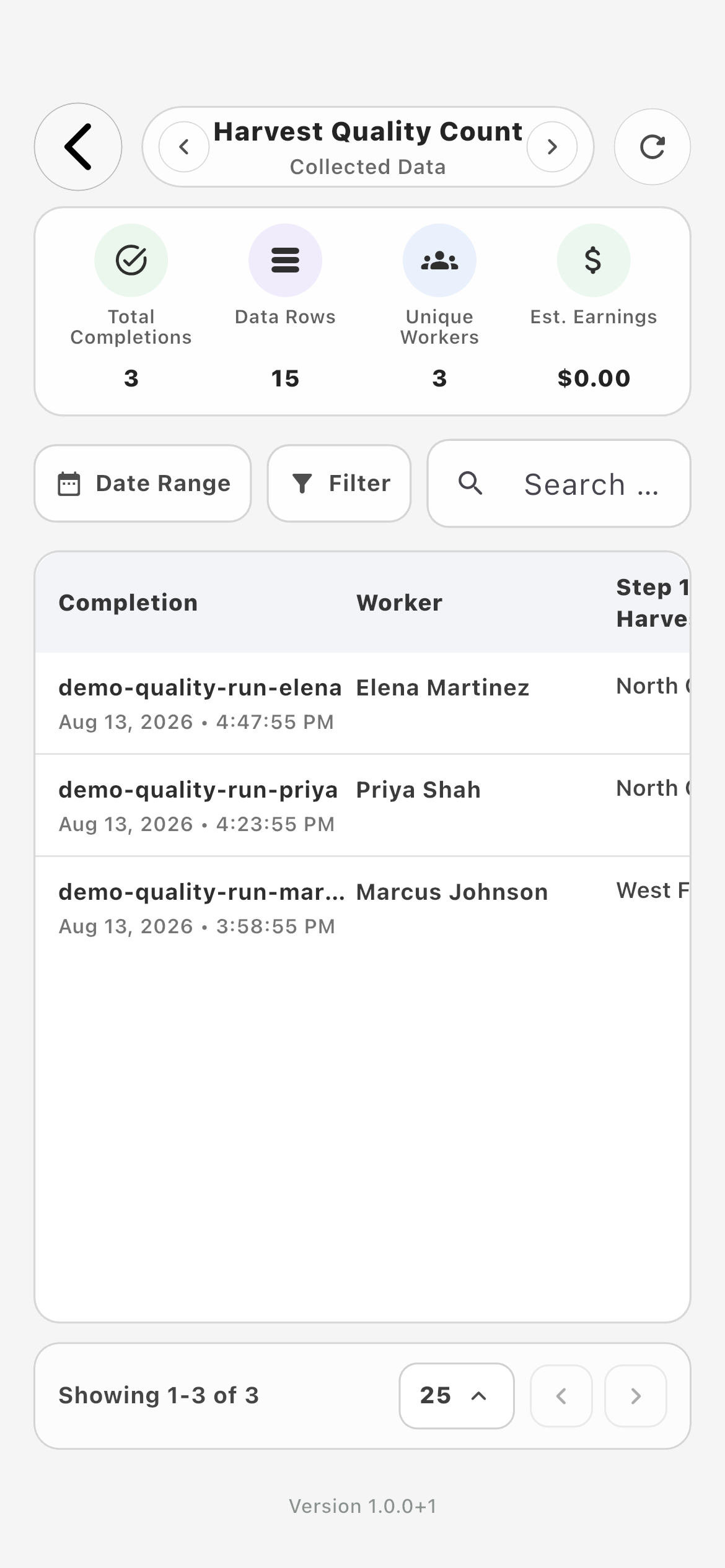
Collected Data01
Farmroute collected task data for completed Harvest Quality Count runs
Compare completed runs, workers, orchard blocks, grades, tote counts, notes, and confirmations in the task’s structured data view.

How it works in practice

Built around the workday.

01
Reusable templates

Define the operation once, then assign the same standard every time.

A task template is the farm-owned definition of the work. Its name, description, tags, instructions, acknowledgement, operations graph, preview, and data view stay together so recurring jobs do not have to be rebuilt for every worker or shift.

  • Editable task metadata
  • Instruction and acknowledgement pages
  • Preview before worker assignment
  • Template-specific data view
02
Operations builder

Capture what the farm actually needs back—not only whether someone tapped Complete.

The Operations Page is a visual sequence of connected blocks. Each block can be mandatory or optional, worker-visible or administrative, and configured with farm-specific labels, choices, limits, notes, and outputs. A harvest record can therefore ask for the field block, grade, tote count, notes, and a quality photo as separate structured values.

  • Text, numeric, decimal, currency and quantity inputs
  • Weight, date, time, dropdown and multi-select inputs
  • Required or optional progression
  • Named outputs retained with the task result
03
Evidence and identity

Attribute the work and attach proof inside the same workflow.

Worker Selection can require an explicit choice, automatically use the person performing the task, or stay hidden when the identity is already known. Media and scan blocks can add photos, files, camera capture, QR codes, and barcodes, while acknowledgement blocks can require a checkbox, typed name, or drawn signature where appropriate.

  • Automatic performing-worker attribution
  • Optional photo or file evidence
  • QR and barcode capture
  • Acknowledgement and signature controls
04
Piece-rate connection

Turn measured output into traceable gross-pay inputs.

A payroll block can connect the worker source and one or more quantity or weight outputs to a pay profile and a specific piece type. The worker records the operational result once; Farmroute can retain the corresponding piece-rate calculation with the task data rather than requiring a second manual entry.

  • Specific pay profile and piece type
  • Quantity- or weight-based sources
  • Worker source linked to the result
  • Historical rate snapshot after completion
05
Farm oversight

Manage templates, live work, and completed records from the same Tasks page.

The farm dashboard separates what is happening now from what happened before. Activity Monitor shows active workers and their current template. History Log opens completed runs and exact task data. Task Templates exposes assignment, information, data, editing, and deletion actions without mixing them into the worker experience.

  • Active worker monitor
  • Completed-run history
  • Exact task result inspection
  • Reusable template management
06
Worker experience

Give the worker one clear decision at a time.

The employee does not see the graph, configuration panels, or farm-only data controls. They see the task name, elapsed time, numbered progress, the current action, its farm-authored note, and the values already captured. Back and Next Step preserve context while mandatory steps prevent incomplete records from being submitted.

  • Mobile step-by-step execution
  • Visible required-step progress
  • Context notes from the farm
  • No unnecessary administrative choices
07
Delivery and reconciliation

Update the shared task state without rebuilding the whole page.

Assignments and task activity use the same farm-worker relationship boundaries as the rest of Farmroute. Real-time events refresh affected local records, while incremental sync from the last checkpoint reconciles a missed event or an offline period. The saved database record remains authoritative.

  • Farm-scoped worker eligibility
  • Immediate event-driven refresh
  • Incremental reconnect sync
  • Database source of truth

Roles and responsibility

Who does what.

Farm profile

Design, assign, monitor, and inspect the work.

The farm owns the reusable task definition and controls which eligible workers receive it. Administrators can preview the employee flow, monitor active execution, and inspect the exact structured result after completion.

  • Build without exposing setup to workers
  • Assign only current farm relationships
  • Reuse one standard across workers and shifts
  • Open the data behind a completed run
Employee profile

Perform the farm’s workflow without administrative clutter.

The employee sees assigned work in a dedicated list and completes each configured step in order. Ordinary operational tasks remain tied to clocked-in work, while template-form requests remain available off the clock for onboarding or compliance use cases.

  • Clear assigned-task list
  • Numbered progress and elapsed time
  • Mandatory steps enforced before submission
  • Form assignments remain the explicit clock-in exception

Complete workflow

From start to finish.

  1. 01
    Farm

    Create the task template

    Give the recurring operation a clear name, description, and tags so it can be found and reused.

  2. 02
    Farm

    Configure setup modules

    Add an Instruction Page when the worker needs preparation or safety context and an Acknowledgement Page when the task requires confirmation before operations begin.

  3. 03
    Farm

    Build the Operations Page

    Add the exact input, media, scan, acknowledgement, and payroll blocks required by the job, then arrange their sequence from Start to submission.

  4. 04
    Farm

    Set behavior per block

    Choose mandatory or optional, visibility, labels, helper notes, accepted options, numeric precision, worker-selection behavior, media limits, or scan rules as appropriate.

  5. 05
    Farm

    Connect payable output when needed

    Link a worker source plus quantity or weight output to the intended pay profile, piece type, and collection unit.

  6. 06
    Farm

    Preview the worker experience

    Run the template before assignment to catch an unclear label, missing output, or impossible required step.

  7. 07
    Farm

    Assign eligible workers

    Select workers with a current relationship to this farm; removing an assignment updates the same shared record rather than leaving a stale checkmark.

  8. 08
    Employee

    Clock in and open Tasks

    Operational tasks unlock during an active clock session. When the employee is not clocked in, Farmroute explains the requirement and links back to Schedule.

  9. 09
    Employee

    Complete the guided sequence

    Enter or capture each required result, move backward when a value needs correction, and submit only after mandatory steps are satisfied.

  10. 10
    Farm

    Monitor live work

    Activity Monitor identifies the active worker and current task while the work is in progress.

  11. 11
    Farm

    Review exact completion data

    History Log and the template Data view retain the structured outputs, worker attribution, timestamps, and any connected evidence or piece-rate result.

  12. 12
    Both

    Reconcile after interruption

    Real-time events update affected records immediately, and incremental sync catches changes missed while the device was disconnected.

Questions and answers

Frequently asked questions.

Can Farmroute create custom farm task workflows?

Yes. A farm can create reusable task templates and arrange worker-facing inputs, media, scans, acknowledgements, and payroll actions into a guided mobile sequence.

What information can a Farmroute task collect?

Tasks can collect text, numbers, decimals, currency, quantities, weights, dates, times, worker selections, dropdown or multi-select choices, photos, files, camera evidence, QR codes, barcodes, acknowledgements, names, signatures, and connected payroll outputs.

Can a farm require some task steps but leave others optional?

Yes. Each workflow block can be mandatory or optional. Mandatory steps prevent progression until the configured result is supplied, while optional notes or evidence can be skipped.

Can Farmroute automatically identify the employee performing a task?

Yes. Worker Selection can be shown for an explicit choice, automatically select the task performer, or remain hidden when the assigned employee is already the correct source.

Do employees have to clock in before completing a task?

Ordinary operational tasks require an active clock session. Assigned template forms remain available without clock-in because onboarding and compliance documents may need completion outside a scheduled shift.

Can a task connect quantities to piece-rate pay?

Yes. A payroll action can link the performing worker and a quantity or weight output to a specific pay profile, piece type, and unit so the operational record can produce a traceable gross-pay input.

How does a farm see whether assigned task work is active or complete?

The farm Tasks page includes an Activity Monitor for current work, a History Log for completed runs, and a task-specific Data view for exact captured outputs.

What happens to task updates when a device reconnects?

Real-time events update the local task state while connected. After a disconnect, Farmroute runs incremental sync from the last checkpoint so missed changes are reconciled against the saved database record.
Get started

Build your operation with Farmroute.

We pride ourselves on transparency. No need to call for a quote.